
The best mobile detailing software for a solo operator is not automatically the platform with the most features. It is the smallest reliable system that helps you quote work, keep the customer and vehicle together, see what is booked, update job status and retain a usable record—without turning software administration into another job.
This guide gives solo detailers a practical way to separate must-have features from growth-stage extras. It also explains where DetailPro by Artsians currently fits, what its free demo proves, and which needs require a broader released platform.
What is the best mobile detailing software for a solo operator?
The best option is the one that removes the most important repeated admin problem without adding unnecessary cost, setup or maintenance. For one detailer, that problem is often scattered information: the customer is in messages, the vehicle is in a notebook, the appointment is in a calendar and the price is in a spreadsheet.
Therefore, begin with the minimum complete workflow:
- Receive or record the enquiry.
- Identify the customer, vehicle and requested service.
- Prepare a clear estimate.
- Record the appointment and agreed value.
- Update the job from booked to completed.
- Retain enough information to review the work later.
If a system completes that sequence reliably from the devices you actually use, it can be valuable even without automation. Conversely, an impressive platform can still be a poor fit when basic quoting takes too long or important fields are hidden on a phone.
Do not confuse a long feature list with a better fit
Published platforms show how wide this category can become. Jobber describes quoting, scheduling, routing, customer records, invoicing and payments. Mobile Tech RX adds detailing-specific functions such as VIN scanning, damage documentation and quality checklists. Urable publishes online booking, automated workflows, routing and employee earnings, while Housecall Pro emphasises booking, dispatch, payments and team operations.
Those capabilities are legitimate comparison categories. However, a solo operator does not benefit from every category equally. The relevant question is: Which repeated problem would this feature remove from my current week?
Six mobile detailing software features you need first
| Essential feature | What it should let you do | Warning sign |
|---|---|---|
| Field-friendly access | Open the day’s jobs and update the record from the phone, tablet or laptop you use in the field. | Important actions only work comfortably on a large desktop screen. |
| Clear estimates | Select a service, record the rate or price, add quantity and extras, and produce a total the customer can understand. | You still rebuild every estimate manually in messages. |
| Customer and vehicle record | Keep the customer, vehicle/model and relevant job information together. | The customer exists in one place and the vehicle in another. |
| Appointment register | See the job date, agreed value and enough context to prepare for the visit. | The system stores a quote but not the booked work. |
| Job status | Distinguish work that is booked, completed or otherwise still open. | Scheduled value is reported as completed work. |
| Retrievable records | Search, review or export important information when you need it. | Your business history is difficult to find or cannot be exported in a useful form. |
Security, privacy and dependable access sit underneath all six. Before entering real customer information, check how the provider stores data, controls access, handles backups and supports export or account closure. A public interactive demo should receive fictional information only.
Which features are useful later rather than essential now?
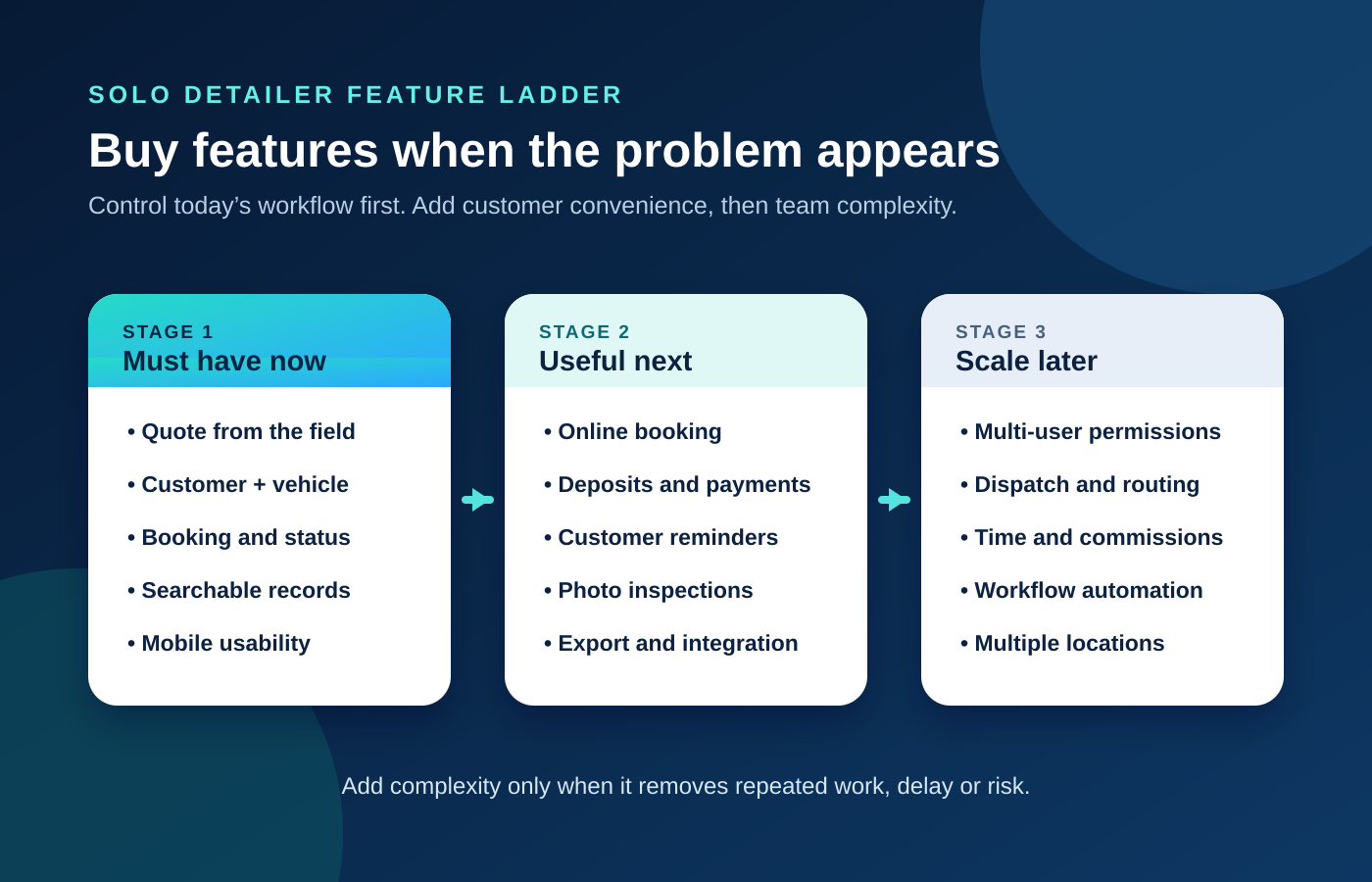
Feature priority changes when the workload changes. The following ladder keeps the decision tied to an operational trigger rather than software marketing.
Useful next: customer convenience and risk control
Online booking becomes valuable when missed calls or slow replies regularly lose enquiries. Deposits and payment links matter when cancellations, no-shows or collection delays create measurable problems. Automated reminders help when manual confirmations take time or customers frequently forget appointments.
Photo inspections and previous-damage documentation deserve earlier priority for high-value vehicles, coatings, paint correction or work where condition disputes are a material risk. VIN scanning can also save entry time and improve vehicle identification, but it is not necessary for every basic wash business.
Scale later: people, routes and operational control
Dispatch, route optimisation and location updates become more important when several jobs or technicians must be coordinated. Likewise, permissions, time tracking, commissions and payroll support solve team-management problems that a one-person business does not yet have.
Buy these features before hiring only when that hiring decision is near and the setup work will genuinely support the transition. Otherwise, you may pay and configure a team system while still operating as one person.
What type of detailing business software fits your stage?
| System type | Best fit | Strength | Main trade-off |
|---|---|---|---|
| Notes, calendar and spreadsheet | Very low job volume with a disciplined manual process | Flexible and familiar | Information fragments easily and repeated entry grows quickly. |
| Focused solo workflow | One operator needing quotes, bookings, status and simple records | Lower complexity and faster setup | May omit payments, automation, routing and integrations. |
| Detailing-specific CRM | Vehicle-focused businesses needing inspections, VIN data, packages or repeat-service tools | Automotive context and deeper detailing workflows | More configuration and features than a basic solo operation may use. |
| General field-service platform | Growing teams needing scheduling, dispatch, payments and broad integrations | Strong end-to-end operational coverage | May feel less vehicle-specific and can require a broader plan. |
A car detailing CRM is simply a customer relationship management system adapted to customer, vehicle and job history. It becomes helpful when repeat service, follow-up and a growing record base make basic scheduling insufficient. However, the label “CRM” does not guarantee that quoting, booking, payment or vehicle documentation will match your process. Test the actual workflow.
Where does DetailPro fit for a solo mobile detailer?
DetailPro currently demonstrates a focused quote-to-record workflow. Its public demo includes Overview, Jobs & customers, Quote builder, Expenses and Reports. Visitors can work with fictional customer and vehicle records, prepare a sample estimate, change booking status, record sample expenses and review completed revenue, recorded costs and recorded margin.
| Solo-operator requirement | What the current demo shows | Boundary to verify |
|---|---|---|
| Customer and vehicle together | Customer, vehicle/model, date, value and status on a job record | Final storage, privacy and production data-handling terms are not demonstrated by fictional data. |
| Simple estimates | Exterior wash, full detail and ceramic coating examples with rate, vehicle quantity, extras and print action | Sample prices are illustrative and do not determine your real scope or rate. |
| Booking visibility | Job register, booked/completed status and open-booking count | Online customer booking and automated quote-to-booking conversion are not shown. |
| Basic commercial review | Completed revenue, recorded expenses, recorded margin and sample JSON export | Recorded margin is not complete accounting or automatically net profit. |
| Team and field operations | Not presented in the current preview | Routing, dispatch, permissions, time tracking and payroll should not be assumed. |
| Payments and automation | Not presented in the current preview | Deposits, invoices, payment processing, reminders and integrations should not be assumed. |
DetailPro remains in early-access validation. Its page displays a proposed one-time price of $49 USD, but no payment is collected. Release timing, final terms and device compatibility are still being evaluated. Therefore, the demo is evidence of the current preview—not a promise of final production scope.
Use this 12-question test before choosing software
- Can I complete the main daily actions comfortably on my actual phone, tablet or laptop?
- Can I create a clear estimate without rebuilding the calculation elsewhere?
- Can I keep the customer and vehicle/model on the same record?
- Can I see what is booked next and what information I need for the visit?
- Can I distinguish booked, completed, invoiced and paid status where those distinctions matter?
- Can I find an earlier customer, vehicle or job quickly?
- Can I export the business records I may need later?
- Does the provider explain privacy, security, backups and support clearly enough for real customer data?
- Does it solve a repeated problem I experience now?
- Which paid or advanced features would I actually use every week?
- Which missing capability would force me to keep a second system?
- Will my confirmed next step—such as online booking or a first employee—require migration soon?
Treat questions 1–8 as operational checks. A failure in a must-have area matters more than five attractive optional features. Questions 9–12 prevent both overbuying and choosing a system you will outgrow immediately.
Test with a realistic fictional scenario
Use a made-up customer, two vehicles, an extra charge, a future appointment and one sample expense. Then move between the estimate, booking and reporting views. The purpose is not to admire the dashboard; it is to discover whether information stays clear when a normal job changes state.
Choose the smallest system that can support the next real stage
Choose a focused tool when you work alone, your immediate need is organised estimates and bookings, and you can handle payment, communication or accounting through a deliberate separate process. Test DetailPro if its customer-vehicle-estimate-job structure matches that need and you accept its early-access status.
Choose a broader released detailing CRM when vehicle inspections, VIN data, deposits, automated reminders or repeat-service marketing are essential now. Choose a general field-service platform when dispatch, routing, crew permissions, invoicing, payments and integrations matter more than vehicle-specific depth.
Finally, remain with a manual system only when it is genuinely controlled: every enquiry, estimate, booking and payment has a defined place, and nothing depends on memory. Once duplicate entry, missed follow-up or unclear job status becomes normal, the “free” system is already consuming time and creating risk.
Frequently asked questions
What is the best mobile detailing software for a solo operator?
The best choice is the smallest reliable system that handles the operator’s present workflow: estimates, linked customer and vehicle records, appointments, job status and retrievable records. Online booking, payments, reminders, routing and team controls should be added when they solve a repeated operational need.
Do I need a full car detailing CRM when I work alone?
Not necessarily. A full CRM becomes more valuable when customer history, repeat-service follow-up, automated communication or a growing team makes a basic job register insufficient. A solo operator with a simple service menu may be better served by a focused workflow, provided records remain organised and exportable.
Which mobile detailing software features are essential?
Prioritise field-friendly access, clear estimates, linked customer and vehicle information, an appointment register, meaningful job status and retrievable or exportable records. Privacy, security, backups and support also need verification before entering real customer data.
When should a solo detailer add online booking?
Add online booking when missed calls, slow replies or manual scheduling regularly cost time or enquiries. Verify that the booking flow collects the vehicle, service, location, duration and deposit information your business actually needs.
Are route optimisation and dispatch necessary for one van?
Usually not as first priorities. A solo operator can often manage a modest route with a normal calendar and mapping app. Dedicated routing and dispatch become more valuable when several daily stops, technicians or vans must be coordinated.
Can I try DetailPro before registering interest?
Yes. Artsians provides a free interactive DetailPro demo with fictional sample data. Visitors can explore estimates, jobs and customers, expenses, reports and booking status. Do not enter real customer information in the public demo.
Is DetailPro available to buy now?
No. DetailPro is in early-access validation. Its page shows a proposed one-time price of $49 USD, but no payment is collected. Release timing, final terms and device compatibility are still being evaluated.
What important features are not shown in the DetailPro demo?
The current public preview does not present online customer booking, quote approval, deposits, invoices, payment processing, automated reminders, route optimisation, dispatch, multi-user permissions, payroll or accounting integrations. Businesses needing those capabilities should compare released products and verify the exact plan.
Sources and review notes
- Artsians: DetailPro product page — positioning, current workflow, proposed price and early-access terms; checked 19 November 2026.
- Artsians: DetailPro interactive demo — current modules and fictional sample workflow; checked 19 November 2026.
- Artsians: DetailPro quoting workflow — current sample estimate structure and limitations.
- Jobber: Auto detailing software — published quoting, scheduling, routing, CRM, invoicing and payment categories.
- Mobile Tech RX: Detailing business software — published VIN, vehicle documentation, estimate, scheduling and reminder features.
- Urable: Vehicle-care software — published booking, workflows, routing, payments and employee-management categories.
- Housecall Pro: Auto detailing software — published booking, scheduling, dispatch, payment and mobile-team categories.
Software capabilities, plan inclusion, pricing and release status can change. Verify required features on the provider’s current product and pricing pages before making a purchase or migration decision.
Comments