



Party rental software for a small business should connect five records that often become scattered: inventory, the customer quote, the booking commitment, fulfilment, and the return. The right system should answer a practical question before the owner promises an event: what can we safely supply, for which dates, at what price, and what must the team do next?
Not every operator needs an enterprise platform. A focused system may suit one owner; a growing team may need online requests, packages, delivery planning, payments, permissions and integrations. This guide separates essential controls from features that can wait.
What should party rental software do for a small business?
The core job is to keep the customer’s promise and warehouse reality synchronized. When a quote changes from 60 chairs to 90, availability, price, pull list and delivery requirements should not continue showing 60 in different places.
A useful system connects these five operational objects:
- Inventory: what the business owns, its quantity, variation, condition, rate and availability.
- Quote: requested items, dates, services, pricing, taxes, discounts, terms and expiry.
- Booking: the accepted commitment, status, customer approval and recorded deposit or payment position.
- Fulfilment: pull, preparation, delivery or pickup, setup, collection and assigned responsibility.
- Return: returned quantity, damage, missing items, cleaning or repair, and release back to ready stock.
If a product handles only invoices or a calendar, it may still be useful, but it is not a complete rental control system. Define the missing steps and who will maintain them before buying.
Which rental inventory features matter first?
Quantity pools and individually tracked items
Some products are rented from a pool: 120 identical white chairs. Others need a specific identity: one photo booth, generator or premium tent. The software should support the tracking level the business actually uses. A serial number on every chair adds work without much value; a single generic record for several different generators may hide condition and maintenance risk.
Date-range availability
Availability must use the complete out-and-back window, not a general stock count. Booqable defines availability from inventory, reservations and optional buffer time. Goodshuffle Pro shows maximum need across a date range and separates stock from logistical conflicts. These are controls to test; systems calculate them differently.
Variations, packages and components
Color, size, material and power requirements can change whether an item is a valid substitute. Packages should reserve every component. If a wedding bundle includes one tent, eight tables, 64 chairs and lighting, selling the package must reduce availability for all four inventory groups.
Condition and unavailability
The catalog should separate ready, out, returned-awaiting-check, damaged, missing, cleaning, maintenance and retired stock where those states matter. A quantity can be physically present and still not be safe to promise.
Subrentals and external supply
External items need their own supplier, confirmation, dates, cost and return obligation. Adding temporary supply to the owned count can create a false permanent quantity after the vendor receives it back.
How should quotes connect to inventory and pricing?
A professional quote should be generated from the same catalog and event record used for availability. Otherwise, staff may type a product description, quantity or rate differently from the inventory record.
Test whether the quote can show:
- Customer and venue information.
- Delivery, event, collection and expected return times.
- Rental items, quantities, rates and rental duration.
- Delivery, setup, teardown, staffing or other service lines.
- Taxes, approved discounts, damage deposits and payment schedule where applicable.
- Terms, cancellation language, customer responsibilities and quote expiry.
- Clear status: estimate only, tentative hold or confirmed reservation.
- Version history or at least a visible record of material changes.
The quote should not imply that inventory is protected unless the workflow actually creates a hold. In Booqable’s documented order process, draft items remain available while reserved items block availability for the rental period. Whatever product you choose, align its status behavior with the language the customer receives.
Keep pricing decisions separate from document formatting
Software can total lines accurately, but it cannot decide whether the underlying rate covers purchase cost, cleaning, labor, damage risk, transport and target margin unless those rules are configured. The next article in this RentPro cluster will cover party-rental pricing for tables, chairs and tents; this article focuses on the operational system that stores and applies the rate.
What should happen after a customer accepts?
Acceptance should move the event into a defined booking status and protect the required inventory. The system should keep the original quote details connected instead of forcing staff to re-enter them into a calendar or warehouse list.
A practical booking record needs:
- Confirmation status and time.
- Accepted document, approval or signature record where used.
- Deposit, paid amount and balance as recorded facts.
- Inventory commitment and visible conflicts.
- Delivery or pickup method, address and time window.
- Setup instructions, access restrictions and customer contact.
- Pull list, load notes and assigned owner.
- Return, damage, missing-item and closeout record.
Online processing is optional for some businesses, but payment tracking is not. A booking should show what was received and what remains due. Reconcile processor, refund and accounting records separately.
Test one connected party rental software workflow

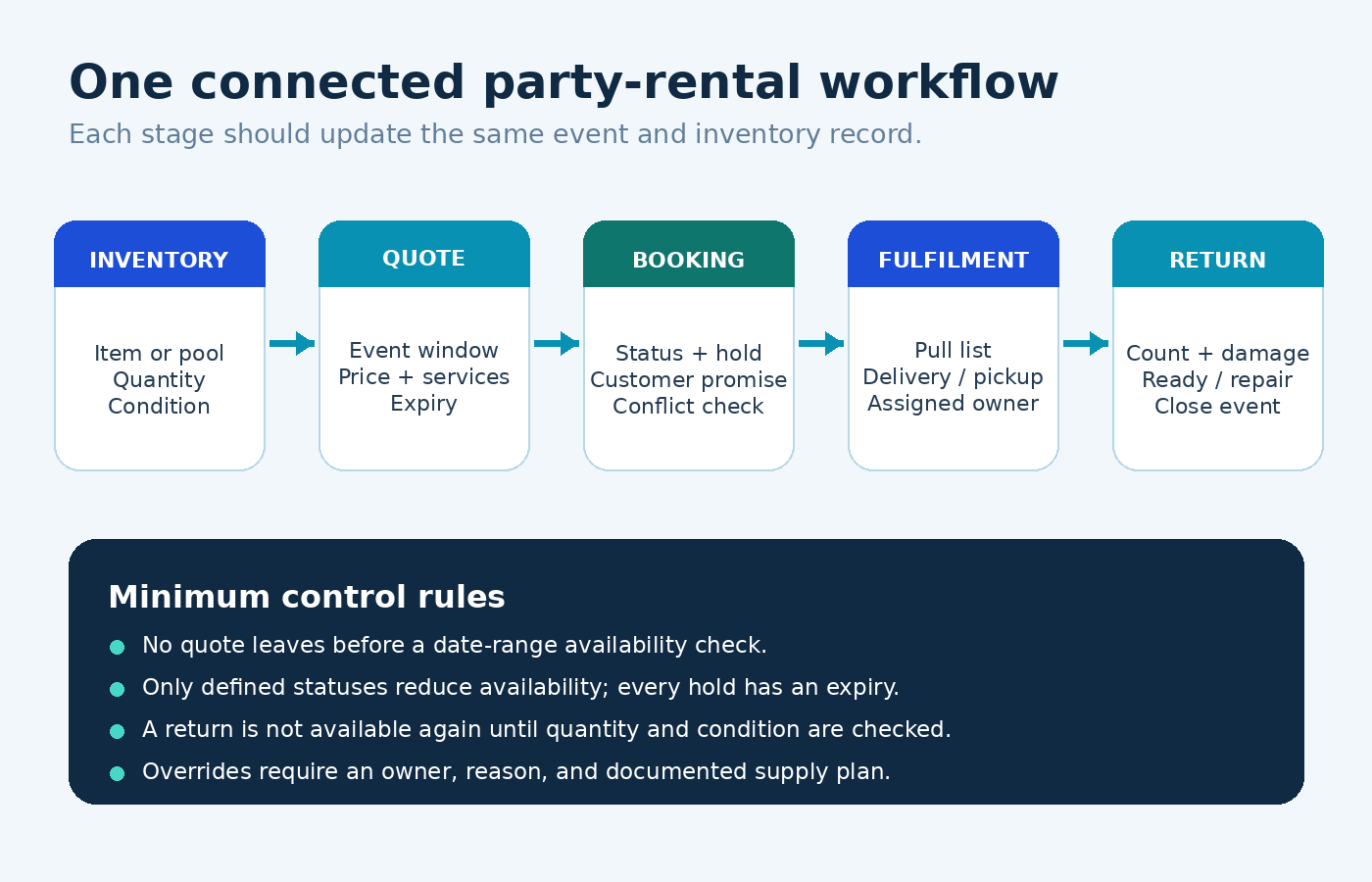
Do not evaluate a product only from a polished feature page. Recreate one real event from inquiry to return:
- Add the actual items, rates, quantities and variations.
- Create a quote for an event that overlaps an existing booking.
- Change the requested quantity and see which records update.
- Place a timed hold, let it expire and confirm that inventory releases correctly.
- Convert the event to confirmed and create the pull or delivery record.
- Return fewer units than went out and block a damaged item.
- Export the customer, inventory and booking data in a usable format.
Then test failure cases: two users editing the same job, unreliable internet, a canceled event, a refund, a date change after confirmation, an incomplete return, and a package with a shared component. Those tests reveal more than a long feature list.
Which features are must-have now, useful next or scale-later?
| Stage | Capabilities to prioritize | Why |
|---|---|---|
| Must-have now | Catalog, quantities, date-range availability, quote status, confirmed reservations, returns, data backup/export | Protects the basic customer promise and business record |
| Useful next | Packages, barcodes, customer-facing requests, contracts, payment tracking, reminders, delivery notes, permissions | Reduces repeated administration as volume grows |
| Scale later | Multi-location stock, route optimization, warehouse scanning, advanced automation, accounting/API integrations, role-level analytics | Supports operational complexity that may not exist yet |
The categories are not universal. A delivery-heavy tent company may need routing early, while a customer-pickup décor business may not. Choose by the present bottleneck plus the next confirmed stage of growth—not by the maximum number of features.
Party rental software vs spreadsheets: when should you switch?
A spreadsheet is not automatically unprofessional. It can be transparent, inexpensive and flexible when one owner handles a small catalog and updates every booking immediately. The risk rises when availability depends on several sheets, staff copy data into customer documents, or simultaneous channels can promise the same item.
| Signal | Spreadsheet can remain controlled | Dedicated software may be justified |
|---|---|---|
| People editing | One accountable owner | Several office, warehouse or sales users |
| Inventory structure | Small, simple catalog | Variants, packages, quantity pools and tracked units |
| Booking volume | Few non-overlapping events | Busy weekends with overlapping preparation and returns |
| Customer channels | Owner-controlled phone or email | Website, social, phone and staff-entered bookings |
| Documents | Templates updated carefully | Repeated re-entry creates quote, contract and invoice errors |
| Operational visibility | Owner knows every job | Warehouse and delivery staff need current task records |
Switch because the new system removes a measured risk or repeated task. “Everyone else uses software” is not a business case. Estimate current admin time, error recovery, missed follow-up and preventable conflict cost, then compare that with setup effort, subscription or license cost, training and ongoing maintenance.
Questions to ask before choosing event rental software
- Does availability use quantities and full date ranges, including buffers?
- Can one product pool and individually tracked units both be handled where needed?
- Do packages reserve every component?
- Which statuses reduce availability, and can holds expire?
- Can quotes, confirmations, pull lists and returns use the same event record?
- How are damage, missing items, maintenance and subrentals represented?
- Can staff roles limit who confirms bookings or overrides conflicts?
- What happens when two users edit the same booking?
- Where is data stored, how is it backed up, and how is it recovered?
- Can all important records be exported in a usable format?
- Which devices, browsers and internet conditions are supported?
- What are the complete costs for users, payments, messages, websites, support, onboarding and future upgrades?
Ask the vendor to demonstrate your hardest scenario rather than a perfect sample order. If an answer is not documented, treat it as unconfirmed.
How to implement rental inventory software safely
1. Clean the source records
Count physical inventory, standardize names and variations, identify damaged or retired items, and separate owned from external supply. Migrating inconsistent data preserves the inconsistency.
2. Configure the commitment rules
Decide which statuses reserve stock, how long holds last, who can confirm events, and what an override requires. Write the customer-facing language at the same time.
3. Start with high-use inventory
Load the products responsible for most bookings, then test several completed events. This exposes workflow problems before the whole catalog depends on the system.
4. Run a short parallel check
For a defined period, compare the new system against the established source of truth. Assign one person to resolve differences. Do not let two systems become equal booking authorities indefinitely.
5. Train by role and exception
Office staff need quote and status rules; warehouse staff need pull, return and damage updates; owners need override and audit procedures. Practice a cancellation, date change, shortage and incomplete return—not only the normal path.
6. Measure whether it improved the work
Track quote time, availability-check time, conflicts found before confirmation, released holds, return discrepancies and re-entry errors. A useful tool should improve a specific control or task.
Where RentPro fits—and what remains unconfirmed
RentPro by Artsians is currently an early-access interactive demonstration, not finished commercial software. Owner-supplied material reviewed in November 2026 showed a proposed $59 USD one-time price and visible modules for equipment availability, overlapping-booking conflict detection, rental estimates and financial reports. The positioning also connects rental quotations, equipment records and bookings.
The demonstration can help a small operator test whether that focused workflow matches the business. However, it is not evidence of production readiness, advanced inventory, live payment processing, permanent centralized storage, multi-user synchronization, backups, integrations or equivalent functionality to established event rental software. Final price, release timing, terms, compatibility and production scope remain unconfirmed.
Use the page to assess the workflow and submit feedback. Before relying on any released version, repeat the seven-step test in this guide and verify storage, backups, concurrent edits, exports, support and complete licensing terms.
Frequently asked questions
What is party rental software?
Party rental software is a business system that connects rental inventory with customer quotes, dated bookings and fulfilment records. Depending on the product, it may also support packages, contracts, payment tracking, websites, delivery work, returns and reporting. The defining requirement is that customer commitments and item availability stay connected and current.
What features does a small party rental business need first?
Start with an accurate catalog, quantity and condition tracking, date-range availability, defined quote and booking statuses, confirmed inventory reservations, return control, backups and data export. Add packages, contracts, payments, delivery tools, automation and integrations only when they solve a real operational need or confirmed next stage of growth for the business.
Can party rental software prevent double bookings?
It can reduce preventable conflicts by subtracting reserved quantities across overlapping windows and warning about shortages. Results still depend on correct inventory, package components, statuses, buffers and return updates. Staff also need clear rules for holds and overrides. No product alone can reliably protect availability from inaccurate or incomplete input.
Is a spreadsheet enough for a new party rental business?
It can be enough when one accountable owner manages a small catalog and few overlapping events in one controlled file. Dedicated software becomes more valuable when several users, channels, packages, date overlaps or warehouse tasks make manual availability and repeated data entry difficult to maintain reliably as the business grows.
What is the difference between a quote and a booking?
A quote presents proposed items, services, price and terms. By contrast, a booking records an accepted commitment under the business’s confirmation rule. A quote may or may not hold inventory, while a confirmed booking normally reduces availability. The customer document and software status must agree so staff do not promise the same stock elsewhere.
Should rental software include online payments?
Not always. Some businesses can record deposits and balances collected through another approved channel. Online processing becomes useful when customers need self-service checkout or staff spend excessive time reconciling payments. Compare processor fees, refunds, disputes, security responsibilities and accounting workflow before making it a requirement for daily operations across the business.
How should I compare party rental software prices?
Compare the same users, catalog size, bookings, website, payments, messages, support, onboarding, integrations and data needs over a fixed period. Include staff setup time and exit or migration cost. A lower headline price is not cheaper over time for the business if essential capabilities require add-ons or manual work remains unchanged.
Is RentPro available as finished software for $59?
No. RentPro is currently an early-access interactive demonstration. Owner-supplied material showed a proposed $59 USD one-time price, but final price, release timing, terms, compatibility and production scope remain unconfirmed. Use the demonstration to assess the workflow, not as proof that a production application is ready to operate the business safely.
Sources and verification
- Booqable order workflow — draft, reserved, picked-up and returned records; checked November 21, 2026.
- Booqable glossary — availability, rental periods, tracked items, buffers and shortages; checked November 21, 2026.
- Goodshuffle Pro item conflicts — inventory and logistical conflict concepts; checked November 21, 2026.
- Goodshuffle Pro date-range availability — in-stock and maximum-needed views; checked November 21, 2026.
- RentPro product page and owner-supplied early-access materials — reviewed November 2026; recheck immediately before publication.
Editorial note: Vendor interfaces, features and commercial terms can change. Verify the current product, data practices, pricing and contractual terms before purchase or operational use.


