



Pressure washing software can reduce repeated entry and connect customer, quote, schedule, expense and payment records. A spreadsheet can remain the better choice for a solo operator with low volume, a simple service mix and disciplined controls. The decision depends on the workflow cost and risk, not the number of features on a sales page.
This comparison gives solo U.S. operators a practical way to choose, improve or migrate their system. It treats spreadsheets as real business tools and software as a process change that must earn its cost.
What must the system control?
Start with the operating record, not the tool category. A solo pressure washing business still needs to know:
- Who requested work and at which property.
- What surfaces and conditions were quoted.
- Which quote version the customer accepted.
- When the job is scheduled and what preparation is required.
- What happened on site, including approved changes.
- What was invoiced, collected, refunded or remains due.
- What labor, chemicals, travel, fees and other costs the job consumed.
- Which customer needs follow-up or recurring service.
A spreadsheet can store all these facts. Dedicated software can connect the records and automate parts of the handoff. Either approach fails when the owner keeps conflicting versions in email, messages, a calendar, paper notes and several files.

When do spreadsheets work well for a pressure washing business?
A spreadsheet is useful when the operator understands the process and wants a flexible model. It can calculate area, rate, estimated price, collected revenue and job cost without committing to a vendor’s structure.
For a small operation, one controlled workbook can include:
| Table | Minimum fields | Control |
|---|---|---|
| Customers | Customer ID, contact, consent and preferred channel | One row per customer |
| Properties | Property ID, address, access and service notes | Link to customer ID |
| Quotes | Quote ID, scope, version, price, status and expiry | Preserve accepted version |
| Jobs | Job ID, date, status, scope, duration and change notes | Link to quote and property |
| Costs | Job ID, labor, mileage, chemical, fee and category | Use actuals after completion |
| Payments | Invoice, collected amount, date, refund and balance | Reconcile with processor or bank |
Google documents that Sheets supports collaboration, protected ranges and version history that can show and restore earlier versions. It also supports offline work after the user enables the feature in a supported browser and makes files available. Those capabilities make a controlled spreadsheet more practical than emailing attachments.
Flexibility is also a responsibility
The owner must design the data model, validation, formulas, permissions, backup and operating rules. A flexible sheet can accept an invalid status or broken formula unless controls are added. Keep one named owner and a short data dictionary.
Where do spreadsheets start to break?
The problem is usually workflow friction rather than row count. Warning signs include:
- The same customer and scope are typed into a quote, calendar, invoice and report.
- A customer approves one version while the schedule contains another.
- Follow-up depends on the owner remembering which rows need attention.
- Job status is represented by cell color with no defined values.
- Two people overwrite a formula or sort only part of a table.
- Photos, approvals and change notes cannot be tied to the job reliably.
- Payment status is not reconciled with invoices and collected amounts.
- Monthly reporting requires manual copying from several files.
Version history can help recover an earlier workbook, but it does not replace an operating process. Offline edits also need careful synchronization. Google notes that offline access must be enabled in advance, recent or selected files must be stored on the device and changes synchronize when the user reconnects.
Do not store payment credentials in ordinary cells
A spreadsheet is not a substitute for a compliant payment processor. Store only the payment status and reference needed for the business record. Review privacy, retention and access for customer information regardless of the tool.
What does pressure washing software add?
Dedicated software normally provides a defined relationship between customer, property, quote, job, invoice and payment. The useful gain is fewer manual handoffs and clearer status when the product matches the business process.
Jobber’s current pressure-washing page describes quotes with photos and optional items, online booking, scheduling, job forms, invoicing, payments, client records and job costing. That is one example of a broad field-service platform. Features and plan requirements can change, so verify the exact tier and workflow before buying.
Software can still create new problems:
- Required fields or status rules may not match the operation.
- Important capabilities may require a higher plan or connected product.
- Setup, import, training and cleanup consume time.
- Automation can send incorrect messages at greater speed.
- Exports may omit attachments, history or relationships.
- Vendor changes, outages and cancellation can affect access.
Evaluate the full quote-to-payment process with realistic exceptions. A polished dashboard does not prove that a date change, refund or scope change works safely.
How do you compare the complete cost?
Spreadsheet cost includes more than the subscription price of an office suite. Software cost includes more than its advertised monthly or one-time amount.
| Cost area | Spreadsheet | Dedicated software |
|---|---|---|
| Setup | Workbook design, formulas, validation and templates | Configuration, import, forms, rates and training |
| Recurring work | Entry, checking, document creation and reporting | Data entry, review, subscription or maintenance |
| Error risk | Broken formulas, duplicate files and missed status | Misconfiguration, automation and vendor dependence |
| Exit | File cleanup and process documentation | Export, migration, attachment recovery and retraining |
Measure current administrative time for two to four weeks. Count quote preparation, scheduling, follow-up, invoice creation, payment reconciliation and reporting. Record errors and delays. Then test the proposed software and include review time.
Monthly workflow value = useful hours released × appropriate hourly value + documented avoided costs.
Released time is not automatically cash savings. State how the owner will use it, such as completing another job, responding faster or reducing evening administration.
Pressure washing software vs spreadsheets for a solo operator
| Situation | Likely fit | Reason |
|---|---|---|
| Low job volume, one service area and one owner | Controlled spreadsheet | Flexibility may outweigh integration value |
| Stable sheet, but quotes and calendar require repeated entry | Controlled hybrid | Improve the weak handoff without replacing analysis |
| Missed follow-up, uncertain status and slow invoicing | Dedicated software test | Connected records may address measurable friction |
| Adding a technician or office user | Dedicated software or tightly controlled shared system | Permissions and concurrent status become more important |
| Complex routing, payments, automation and customer portal | Broader field-service platform | A focused estimate tool may be too narrow |
| Custom management analysis is the main need | Spreadsheet retained alongside system of record | Exported data can support flexible analysis |
The result can change as the business changes. Review the decision when volume, team size, service mix, payment method or reporting needs change materially.
How do you build a controlled hybrid?
A hybrid works when each field has one authoritative home. For example, dedicated software may own customers, quotes, jobs and payment status, while a spreadsheet owns rate analysis and monthly scenario planning.
Write a simple ownership table:
- System of record for customer and property.
- System of record for quote scope and accepted version.
- System of record for scheduled date and job status.
- System of record for invoice, payment and refund.
- Method and frequency for expense import or entry.
- Reporting export, reconciliation owner and review date.
Avoid maintaining the same changing status in two places. A reporting copy can be refreshed from the operational system, but edits should flow back only through a defined process.
How do you migrate without disrupting jobs?
- Document the current workflow, fields, formulas and exceptions.
- Clean duplicates and standardize customer, property and job IDs.
- Export and preserve a verified backup before changing anything.
- Configure rates, statuses, tax treatment, messages and permissions in the new system.
- Import a small test set with open quotes, scheduled work and completed jobs.
- Reconcile totals, attachments, status and customer history.
- Run both systems for a short defined period without creating two active sources of truth.
- Train the actual daily workflow and document the exception route.
- Export again and test recovery before canceling the earlier service.
Do not migrate every obsolete note merely because it exists. Keep records required for tax, legal, privacy and contractual reasons, and bring active operational data into the new workflow in a usable structure.
How should a solo operator evaluate WashPro?
WashPro by Artsians is presented as an early-access focused workflow. The current demonstration uses fictional data and includes overview, jobs and customers, quote builder, expenses and reports concepts. The owner-supplied material describes a proposed $39 one-time price and no payment during interest registration.
Test the free interactive demo with the same fictional records used in the current spreadsheet. Create a quote, change the scope, record an expense, complete the job and compare the report. Then test export and recovery.
WashPro should not be treated as equivalent to a full field-service platform without evidence. Verify current production readiness, centralized storage, backups, multi-user behavior, invoicing, payments, scheduling, automation, support, updates, integrations and device compatibility before relying on it.
Frequently asked questions
Can a solo pressure washing business run on spreadsheets?
Yes, when job volume is manageable and the owner maintains one controlled workbook, a calendar and consistent document templates. The system needs unique job IDs, defined statuses, protected formulas, backups and regular reconciliation. A loose collection of files and messages is much harder to control.
When should I switch from spreadsheets to pressure washing software?
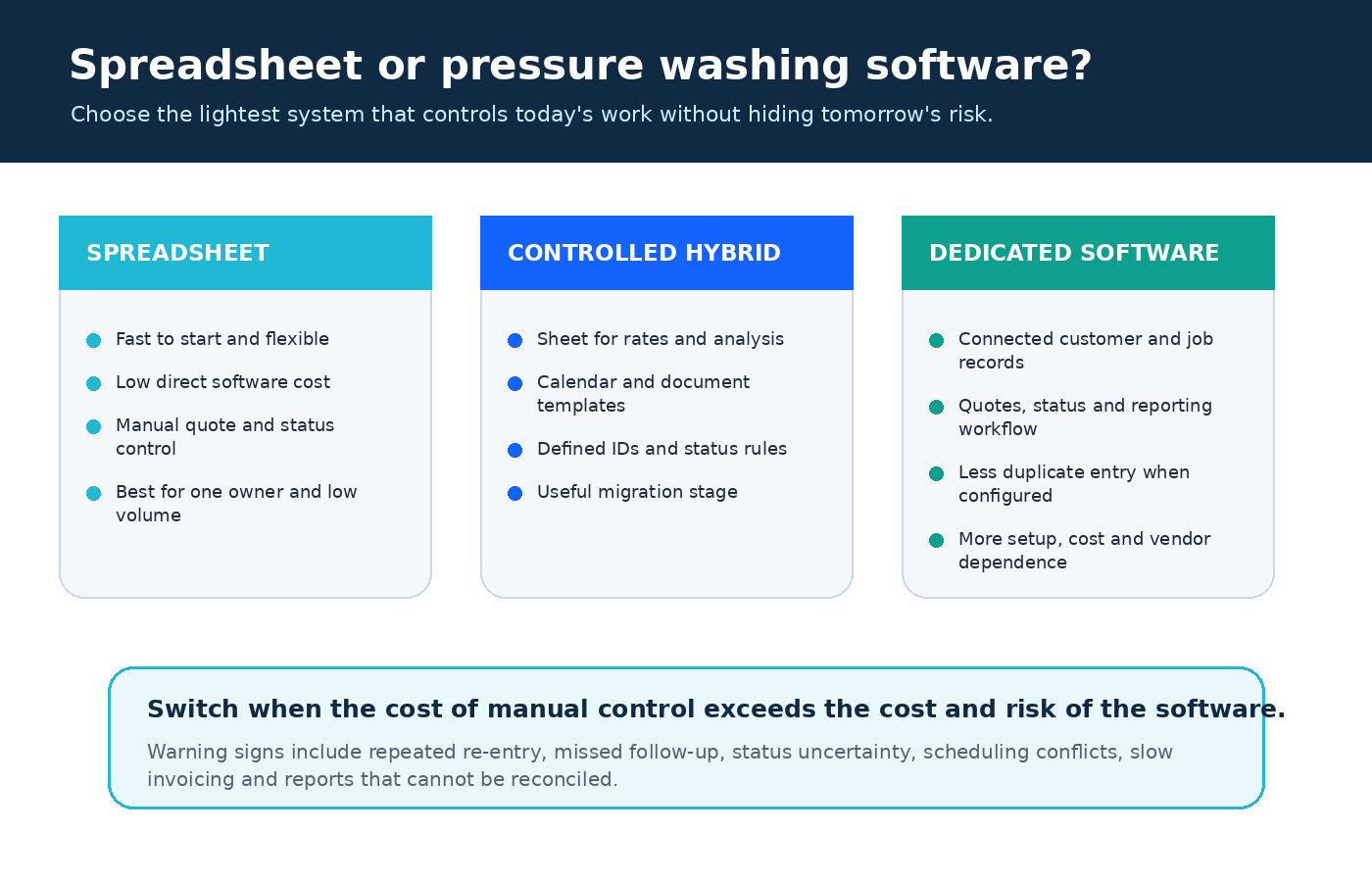
Switch when repeated entry, missed follow-up, uncertain status, scheduling conflicts, slow invoicing or weak reporting create more cost and risk than the software. Measure the current admin time and errors, test the proposed workflow and migrate only the records needed for active operations.
Is pressure washing software worth it for one person?
It can be when connected quoting, scheduling, customer history, invoicing or job costing releases useful time or prevents costly mistakes. A solo operator with low volume and a disciplined spreadsheet may gain little. Compare full cost, setup, support, export and the real workflow improvement.
What should a pressure washing spreadsheet include?
Use separate but linked tables for customers, properties, quotes, jobs, expenses and payments. Include unique IDs, status, service date, scope, amount, collected revenue, direct cost and follow-up date. Protect formulas and avoid storing sensitive payment information in ordinary cells.
Are spreadsheets safer than cloud software?
Safety depends on access control, sharing, device security, backup, updates, vendor practices and user behavior. A local file can be lost or copied. A cloud tool can be misconfigured or unavailable. Review the actual data, permissions, recovery process and provider terms for either approach.
Can I use a spreadsheet and pressure washing software together?
Yes. A controlled hybrid can keep rate analysis or management reporting in a spreadsheet while dedicated software handles customer, quote, schedule and payment workflows. Define the authoritative record for each field and avoid copying the same status between systems without reconciliation.
What data should I export before changing software?
Export customers, properties, open quotes, scheduled jobs, invoices, payment status, expenses, price lists, notes and relevant attachments in usable formats. Test the files before canceling access. Keep records according to tax, legal, privacy and contractual requirements that apply to the business.
How does WashPro compare with a spreadsheet?
WashPro’s early-access demonstration connects sample quotes, jobs, customers, expenses and reports in a focused workflow. A spreadsheet is more flexible and transparent but requires manual design and control. Test both with the same fictional jobs, then verify WashPro’s current storage, exports, release status and terms.
Sources and review notes
- Google Docs Editors Help: Collaborate in Sheets and use version history
- Google Docs Editors Help: Work offline
- Jobber: Pressure washing software workflow
- Artsians: WashPro early-access page
- Artsians: WashPro interactive demo
Product and source material was reviewed on November 24, 2026. Recheck current features, prices, plan requirements, exports and terms before publication or purchase.


