

The best AI tools for social media marketing do more than write captions. They help you turn one strong idea into platform-ready posts, keep a realistic publishing calendar, answer comments, repurpose video, and learn from results. However, adding twelve subscriptions will not make a weak strategy better. Most small teams need only two or three tools that fit together.
This guide compares twelve practical options for 2026. You will see what each tool does well, where it falls short, whether a free plan exists, and which type of user it suits. Pricing and plan details were checked against official product pages on 6 November 2026; nevertheless, prices, taxes, limits, and features can change by country or billing cycle.
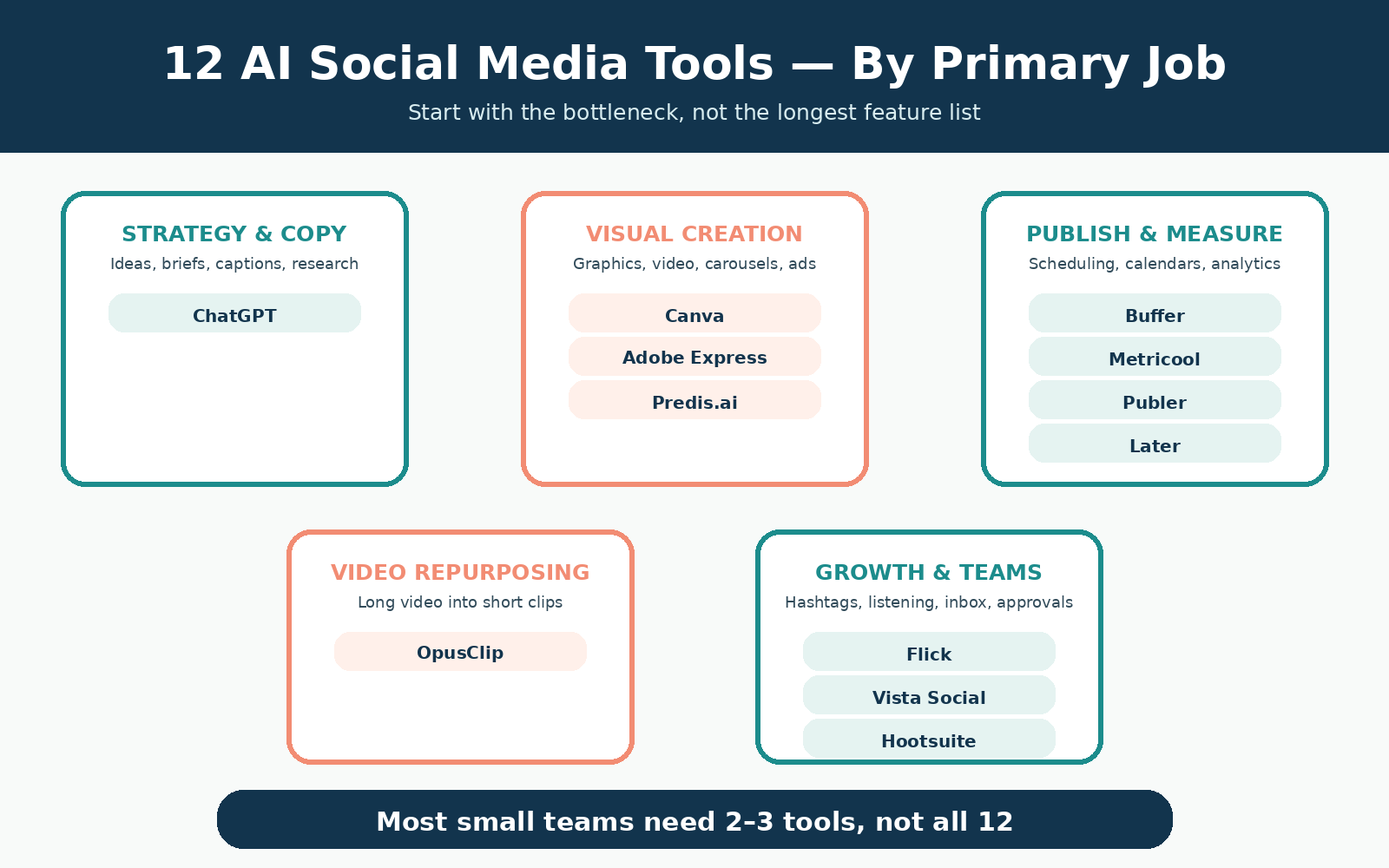
Quick answer: Start with ChatGPT for ideas and copy, Canva or Adobe Express for visual assets, and Buffer, Metricool, or Publer for publishing. Then add a specialist such as OpusClip only when video repurposing becomes a regular job. Larger teams may need Later, Vista Social, or Hootsuite for approvals, inbox work, listening, and reporting.
Best AI social media tools: quick picks
- Best for strategy, research, and copy: ChatGPT
- Best for branded visual content: Canva
- Best free design-and-scheduling combination: Adobe Express
- Best simple scheduler for beginners: Buffer
- Best value for planning and analytics: Metricool
- Best low-cost automation option: Publer
- Best visual calendar for Instagram-led brands: Later
- Best for generating complete social posts: Predis.ai
- Best for turning long videos into short clips: OpusClip
- Best for Instagram captions and hashtags: Flick
- Best for multi-brand teams and AI agents: Vista Social
- Best for mature teams, listening, and governance: Hootsuite
How we ranked AI tools for social media marketing
“Best” is not a universal score. Instead, each recommendation is tied to a clear job and user. We reviewed official feature pages, help documents, and pricing pages. Then we compared five practical factors:
- Creation: Can the tool help with ideas, captions, graphics, video, or repurposing?
- Publishing: Can it schedule the platforms and post types a small team actually uses?
- Measurement: Does it provide enough analytics to guide the next decision?
- Ease: Can a beginner get value without a long setup or complex training?
- Value: Is there a useful free plan, trial, or sensible entry tier?
We also looked for important limits. For example, some free plans exclude LinkedIn or X, while others cap scheduled posts, profiles, or AI credits. Therefore, the comparison does not treat a large feature list as proof that a tool suits every business.
If you are still deciding which channels belong in your plan, first review how SEO, content, social media, advertising, and email fit together in this Artsians guide to digital marketing services.
12 AI tools for social media marketing compared
The table gives you a fast shortlist. Still, check each full review before paying because a low starting price can hide profile, user, or usage limits.
| Tool | Best for | Schedules posts? | Free access? | Starting paid access* |
|---|---|---|---|---|
| ChatGPT | Strategy, ideas, copy, research | No direct social scheduler | Yes | Paid upgrades vary by plan/region |
| Canva | Branded graphics and short video | Yes, on Pro | Yes | Pro: US$144/year |
| Adobe Express | Design plus generous scheduling | Yes | Yes | Premium/team options available |
| Buffer | Simple publishing and light AI help | Yes | Yes | US$5/channel/month, annual billing |
| Metricool | Planning, analytics, and competitors | Yes | Yes | Paid plans vary by brands/billing |
| Publer | Low-cost scheduling and automation | Yes | Yes | From US$4/month, annual billing |
| Later | Visual planning and team approvals | Yes | Trial | US$18.75/month, annual billing |
| Predis.ai | Complete AI-generated social assets | Plan-dependent | Trial | Core listed from US$19/month |
| OpusClip | Long-video-to-short-video repurposing | Pro plan | Yes | Starter: US$15/month |
| Flick | Instagram ideas, captions, and hashtags | Yes | Trial | Solo: £11/month, annual billing |
| Vista Social | Multi-brand teams and AI agents | Yes | Trial | Professional: US$99/month |
| Hootsuite | Listening, workflows, and governance | Yes | Trial | Displayed dynamically by market |
*Officially listed prices checked 6 November 2026. Taxes, currencies, introductory offers, annual commitments, add-ons, AI credits, and account limits may change. Always confirm the final checkout price.
The 12 best AI tools for social media marketing in 2026
1. ChatGPT — best for strategy, research, and social copy
Why it stands out: ChatGPT is the most flexible starting point in this list. You can use it to develop audience questions, compare campaign angles, draft captions, turn a webinar into a post series, analyze a CSV, or create a content brief. In addition, web search can help with current research when you open and verify the cited sources.
Best workflow: Give it a verified brand brief, approved examples, audience details, campaign goal, channel, and limits. Then request one asset at a time. For example, ask for three LinkedIn angles before asking for complete posts. This approach produces a cleaner decision trail than requesting thirty captions at once.
Limit to know: ChatGPT does not replace a social scheduler, and it can still make confident mistakes. Therefore, check facts, claims, quotations, dates, and platform rules before publishing. Artsians’ step-by-step ChatGPT digital marketing guide explains that review process in more detail.
If ChatGPT itself is new to you, begin with Artsians’ plain-language introduction to ChatGPT before building a repeatable social workflow.
Pricing: A Free plan is available with limits on some tools. Paid plans raise usage and feature access.
2. Canva — best for branded graphics and short-form assets
Why it stands out: Canva combines templates, stock media, design tools, video editing, and AI features in one familiar workspace. As a result, a non-designer can turn an approved campaign idea into carousels, vertical videos, stories, thumbnails, and ads without moving between several apps.
Best workflow: Build the design manually first, save brand colors and fonts, and then use AI for variations, resizing, background work, or rapid concepts. Also, keep a locked master template so each platform version stays consistent. Pro includes social content scheduling, which is useful when one person creates and publishes the work.
Limit to know: Easy templates can make several brands look alike. Instead of accepting the first design, replace generic stock images, improve spacing, and add real product or team material. Moreover, check image rights and AI usage terms for commercial work.
Pricing: Canva Free includes limited AI access. Canva Pro was listed at US$144 per year for one person and included social scheduling when checked.
3. Adobe Express — best free combination of creation and scheduling
Why it stands out: Adobe Express offers templates, image and video tools, caption help, and a built-in Content Scheduler. Notably, Adobe’s official help page states that Free users can schedule up to 1,000 posts per month and connect one account per supported social channel. That is unusually generous for a free creative tool.
Best workflow: Create a campaign set inside one project, adapt the layout for each platform, preview each post, and then place the assets in the calendar. Meanwhile, AI caption generation can provide a first draft inside the scheduling flow. The scheduler supports major networks, including Instagram, Facebook, LinkedIn, TikTok, Pinterest, YouTube, and X.
Limit to know: A high scheduling limit is not a reason to post more. First, define a useful cadence and verify that each platform’s format, tag, link, and account requirements are supported. Also, some premium creative and brand features require a paid plan.
Pricing: The Adobe Express Content Scheduler is available on Free with stated limits; premium and team plans add capacity and controls.
These first three AI tools for social media marketing focus mainly on ideas and creation. However, the next group becomes more valuable when missed publishing dates and scattered analytics are the real problem.
4. Buffer — best simple scheduler for beginners
Why it stands out: Buffer keeps the publishing workflow clear. Its Free plan supports up to three channels, ten scheduled posts per channel, an ideas area, basic insights, and the AI Assistant. Consequently, a solo marketer can test a genuine weekly system without paying first.
Best workflow: Store rough ideas, use the AI Assistant for caption variations, and move approved drafts into a simple posting queue. Then review performance by channel instead of copying the same post everywhere. Buffer also recommends checking AI suggestions, which is sensible for every tool in this guide.
Limit to know: Ten queued posts per channel is enough for a small test but can feel tight for daily publishing. In addition, advanced analytics, campaign tags, custom UTM settings, and unlimited scheduling require paid access. Pricing also scales by connected channel, so count your profiles before upgrading.
Pricing: Buffer Free covers three channels. Essentials was listed at US$5 per channel per month with annual billing.
5. Metricool — best value for planning and analytics
Why it stands out: Metricool brings planning, analytics, competitor tracking, and an AI social assistant into one dashboard. Therefore, it is useful when you want more insight than a basic queue provides but do not yet need an enterprise platform.
Best workflow: Schedule a small campaign, label the content themes, and compare reach, engagement, clicks, and growth over the same period. Next, use the competitor view to study patterns rather than copy posts. The AI assistant can support drafts, but the analytics should shape the final brief.
Limit to know: The Free plan manages one brand and schedules up to twenty posts per month. However, Metricool’s help centre says Free excludes LinkedIn and X, report downloads, SmartLinks, some integrations, and several other features. It also limits AI text generation credits.
Pricing: Metricool Free does not expire. Paid Starter, Advanced, and Custom plans expand brands, connections, reports, history, and integrations.
Among AI tools for social media marketing, Metricool is especially useful when the team needs one planning view and enough data to decide what should change next.
6. Publer — best low-cost scheduling and automation
Why it stands out: Publer offers a practical Free plan and relatively low entry prices. Free users can connect three social accounts, keep ten scheduled posts per account, and save twenty-five drafts. Moreover, the calendar, post preview, feed preview, and Link in Bio tools cover many everyday publishing needs.
Best workflow: Create approved evergreen posts, schedule them by channel, and use reminders for formats that may require a mobile step. If you upgrade, AI Assist can generate or improve text, suggest hashtags, create images, and help with replies. Business plans also add analytics, reports, competitor analysis, and best-time recommendations.
Limit to know: Free excludes X and provides only trial credits for AI Assist. Therefore, choose Publer for the scheduler first; do not assume unlimited AI is included at the lowest level. Platform rules can also affect automatic publishing for certain post types.
Pricing: Publer Free supports three accounts. Professional was listed from US$4 per month with annual billing, while unlimited AI prompts were shown on Business.
At this point, many small businesses already have enough. In fact, one creation tool plus Buffer, Metricool, or Publer can cover most of the weekly workload. Add another platform only when a clear bottleneck remains.
7. Later — best visual calendar for Instagram-led brands
Why it stands out: Later is built around visual planning, publishing, Link in Bio, analytics, and team workflows. So, it suits retail, food, beauty, travel, and creator-led brands that care about how a feed and short-form calendar look together.
Best workflow: Plan the visual sequence, use AI Ideas and Caption Writer for early drafts, and schedule after checking the grid, format, and call to action. Growth also adds approvals, a social inbox, UGC collection, and more analytics history. As a result, a small team can move from informal chat approvals to a visible process.
Limit to know: AI credits are limited by plan, and the official help page describes Caption Writer as an English-language beta feature. Furthermore, Starter caps scheduled posts per profile and does not offer extra social sets or users. Teams can outgrow it quickly.
Pricing: Later Starter was listed at US$18.75 per month with annual billing and a fourteen-day trial.
8. Predis.ai — best for generating complete social posts
Why it stands out: Predis.ai focuses on producing ready-to-edit posts, carousels, short videos, captions, and ad creatives from a prompt. Therefore, it can be useful for a small team that lacks production capacity but still has a clear brand brief and review process.
Best workflow: Start from an approved topic and offer, generate two or three creative directions, and then edit the strongest option. Next, replace generic imagery and confirm every product claim. Competitor analysis can inspire questions, while the publishing features can move approved work toward selected channels.
Limit to know: Credits, brands, channels, generation speed, and auto-posting vary by plan. In addition, the current pricing page states that the trial lasts three days and requires a card. Cancel before it ends if the tool is not suitable. Fully generated designs can also feel repetitive without manual art direction.
Pricing: Predis.ai Core was listed from US$19 per month, with higher tiers for more brands, credits, and channels.
9. OpusClip — best for turning long videos into short clips
Why it stands out: OpusClip finds potential moments inside a long video, reframes them for vertical viewing, adds captions, and scores clips. Consequently, it can turn a webinar, interview, podcast, lesson, or product demonstration into a short-form editing queue.
Best workflow: Upload a video you own, review every suggested clip, correct captions, and adjust the opening seconds. Then remove any segment that loses context or misrepresents the speaker. Pro also supports several aspect ratios, brand templates, social connections, and scheduling.
Limit to know: A “virality score” is not a promise of reach. Instead, judge each clip by clarity, relevance, pacing, and the audience’s likely next question. The Free plan adds a watermark, lacks editing, and places time limits on exporting processed clips.
Pricing: OpusClip Free includes sixty credits per month. Starter was listed at US$15 per month, while Pro added scheduling and team features.
For teams comparing AI tools for social media marketing, OpusClip is a specialist. It complements a planner or scheduler rather than replacing the whole social workflow.
10. Flick — best for Instagram captions, hashtags, and planning
Why it stands out: Flick combines an AI assistant, post ideas, caption writing, repurposing, hashtag research, scheduling, and Instagram analytics. Thus, it can suit creators and small brands that want one guided workspace for organic Instagram work.
Best workflow: Give the assistant real brand examples, create a small content plan, and then use hashtag groups that match each topic. Meanwhile, the scheduler and feed preview help keep the plan visible. Analytics can show whether the chosen themes and tags support reach and engagement.
Limit to know: Analytics are mainly Instagram-focused, and the Solo plan caps scheduled and tracked posts. Also, hashtag performance should not distract you from stronger signals such as saves, qualified profile visits, leads, and sales. A clever hashtag cannot rescue irrelevant content.
Pricing: Flick Solo was listed at £11 per month with annual billing, four profiles, and a seven-day trial.
11. Vista Social — best for multi-brand teams and AI agents
Why it stands out: Vista Social combines publishing, engagement, analytics, listening options, and team management. Its Ask Vista assistant can work with connected account data, the content calendar, the inbox, brand rules, and performance history. As a result, its answers can be more operational than those from a general writing tool.
Best workflow: Use brand rules and permissions first. After that, ask the assistant to explain a performance change, prepare a draft calendar, or help clear the inbox. Scheduled agents can handle repeated analysis or reporting jobs, while a person approves outward-facing actions.
Limit to know: Vista Social now targets professional teams more than budget-conscious solo users. Furthermore, listening and X can carry separate charges, and AI usage is credit-based. Calculate the complete cost for profiles, users, and add-ons before starting a trial.
Pricing: Vista Social Professional was listed at US$99 per month for fifteen profiles and two users, with a fourteen-day trial.
12. Hootsuite — best for mature teams, listening, and governance
Why it stands out: Hootsuite supports publishing, inbox work, monitoring, analytics, approvals, and large-team controls. Wisdom, formerly OwlyWriter AI, can draft posts, surface trends, summarize social insights, and work with connected brand context. Therefore, it is strongest when social media is a coordinated business function rather than a one-person task.
Best workflow: Connect approved accounts, define roles, and set up listening and reporting around the decisions that matter. Then use Wisdom to explore current conversations, draft campaign ideas, and explain performance. Advanced tiers add approvals, routing, custom reports, team measurement, and governance.
Limit to know: Hootsuite can be more tool than a small business needs. Pricing is also displayed dynamically by market, and add-ons or user counts can affect the final cost. Consequently, map the required profiles, users, listening topics, approvals, and reports before requesting a plan.
Pricing: Hootsuite offers a fourteen-day trial. Confirm the current local price and contract terms directly on the official plan page.
How to choose the right AI social media stack
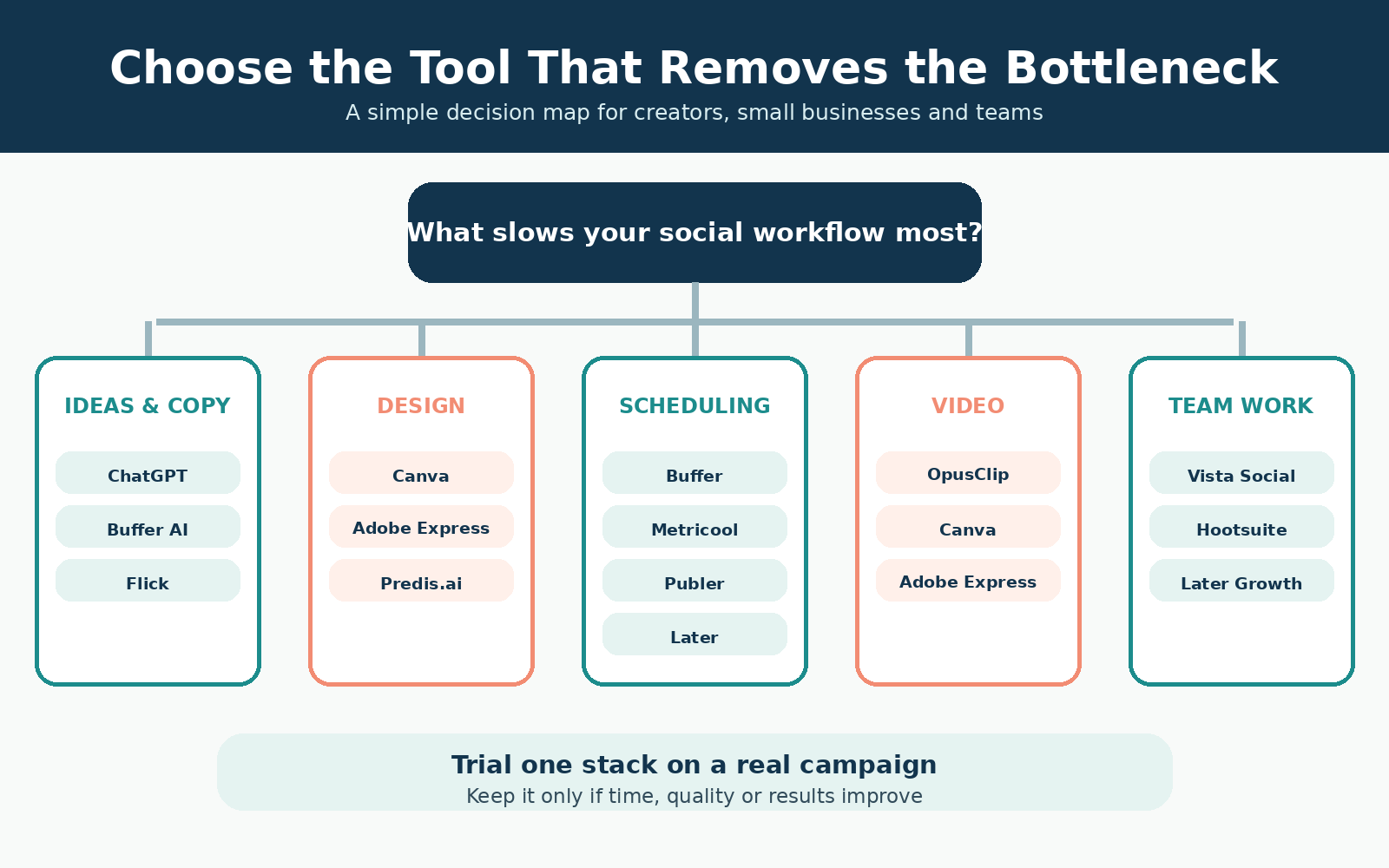
The smartest choice starts with the slowest part of your current process. For instance, do not buy a new scheduler if posts are late because nobody approves the visuals. Likewise, a caption generator will not solve weak offers or unclear audience research.
If ideas and captions are the bottleneck
Begin with ChatGPT. Alternatively, use Buffer’s AI Assistant if you want writing inside the publishing queue. Flick is a better fit when Instagram ideas, captions, and hashtags are closely connected. In every case, supply real customer language and approved examples.
If design production is the bottleneck
Choose Canva for template depth and brand-friendly visual work. However, Adobe Express is compelling when free scheduling matters. Predis.ai can create more complete post packages, while OpusClip is more suitable for repurposing long video.
If consistency and scheduling are the bottleneck
Start with Buffer for simplicity, Metricool for stronger analytics, or Publer for budget automation. Later makes sense when a visual calendar and approval flow are central. Before deciding, count every profile and check whether your must-have networks are included.
If team coordination is the bottleneck
Consider Later Growth, Vista Social, or Hootsuite. First, list the users, roles, approval steps, inbox volume, reporting needs, and listening topics. Then request a trial that mirrors the real workflow. Otherwise, the demo may look impressive without proving day-to-day value.
Three lean stack examples
| Team | Suggested stack | Why it works |
|---|---|---|
| New small business | ChatGPT Free + Adobe Express Free | Ideas, drafts, design, and scheduling with no required subscription |
| Solo creator with video | ChatGPT + Canva + OpusClip + Buffer | Planning, branded assets, short clips, and a clear publishing queue; freelancers can also use this AI freelancing starter guide |
| Small agency | Canva + Metricool or Publer + client approval process | Repeatable creation, multi-brand scheduling, analytics, and controlled review |
These are starting points, not fixed recipes. Therefore, trial one stack for a complete campaign before migrating every account.
A human-reviewed workflow for AI social media tools
1. Start with source material
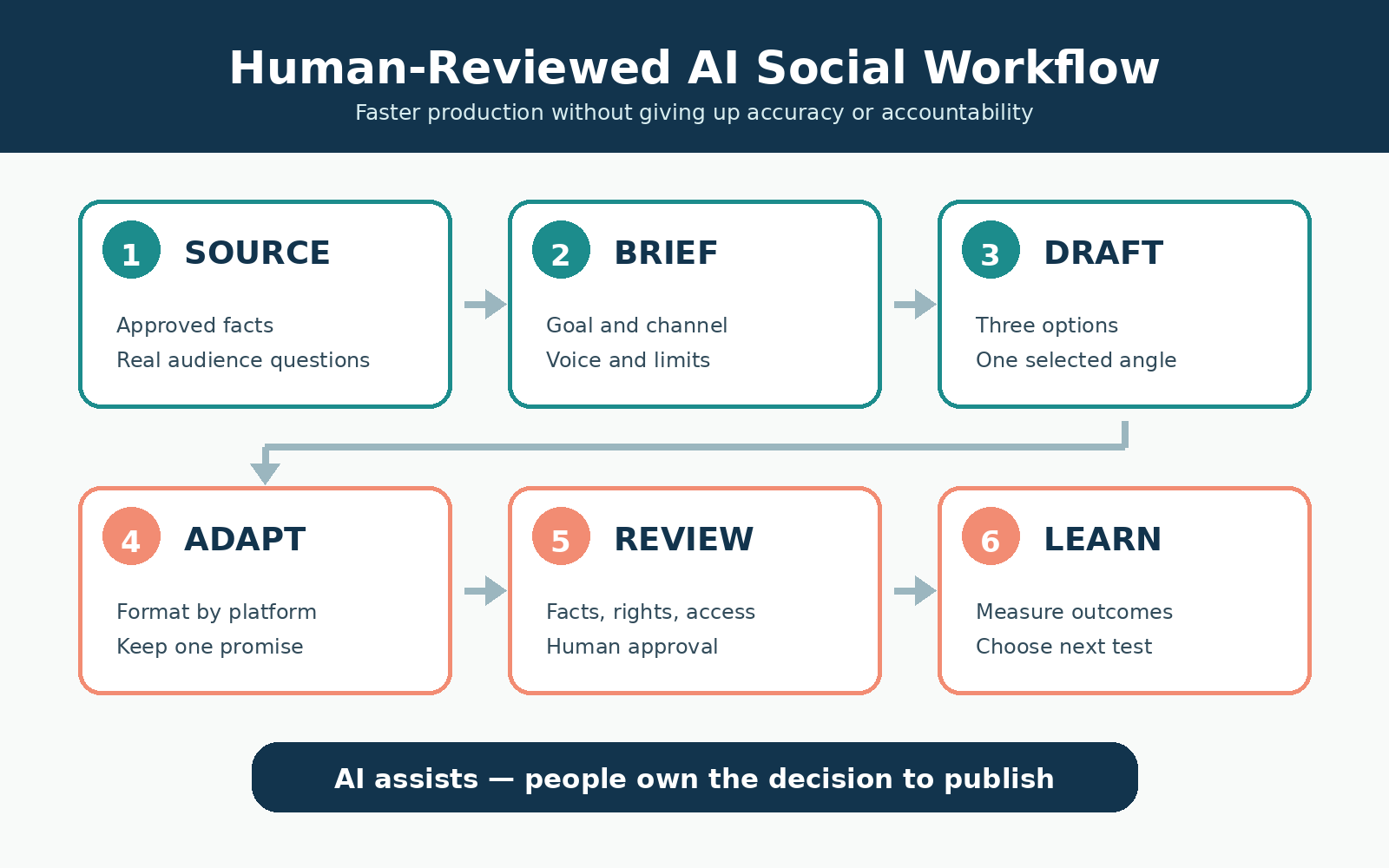
Collect the approved offer, product details, customer questions, brand examples, photographs, and campaign goal. Then remove private or unnecessary personal data. Strong inputs make the output easier to check.
2. Create a brief before creating posts
Define the audience, channel, message, format, call to action, proof, and limits. Also, state what the tool must not invent. If a fact is missing, require a visible [VERIFY] marker.
3. Generate a small number of options
Ask for three angles, not thirty finished posts. Next, select one direction based on the goal and audience. This keeps the human decision visible and reduces wasted content.
4. Adapt each approved idea by channel
Change the hook, length, visual ratio, link behavior, and call to action for each platform. Meanwhile, keep the core promise consistent. Copying one caption everywhere rarely produces the best result.
5. Review before scheduling
Check facts, spelling, image rights, accessibility, links, platform policies, consent, and required disclosures. In addition, view the post on mobile. A scheduled error can spread faster than a draft error.
6. Measure the business result
Review reach and engagement, but connect them to qualified visits, leads, sales, retention, or another meaningful outcome. Finally, save what you learned and change one major variable in the next test.
This workflow matters more than the number of subscriptions. When teams use AI tools for social media marketing without a review system, they often publish more content but learn less.
Common mistakes when buying AI social media tools
Paying for overlapping features
Canva, Adobe Express, Predis.ai, Flick, Buffer, and several schedulers can all help with captions or ideas. Therefore, draw a simple feature map before subscribing. Keep the tool that does the core job best and remove duplicate extras.
Ignoring profile, user, and AI-credit limits
A low headline price may cover one channel, one brand, or very few AI generations. Consequently, calculate the cost for your real number of profiles, users, posts, reports, and credits. Include taxes and required annual billing.
Automating comments without guardrails
AI can suggest replies, but sensitive complaints, refunds, safety issues, and personal cases need a person. Instead, define escalation rules and approved response boundaries before connecting inbox automation.
Using generic AI visuals as final creative
Generated images can help with concepts. However, they may include errors, false product details, or an artificial look. Use real product, customer-approved, team, or process imagery whenever trust matters.
Scheduling without platform review
Every platform supports different post types, tags, music, links, and account settings. So, confirm the preview and connection status before relying on automatic publishing. Also, keep login recovery and ownership under business control.
Confusing more posts with more growth
Consistency helps, but volume alone is not a strategy. Instead, study which questions attract the right audience and which calls to action produce a useful next step. Growth should support the business, not only the dashboard.
A 30-day test plan before you commit
Week 1: measure the current process
Record how long ideation, creation, approval, scheduling, community work, and reporting take. Then choose the single bottleneck with the clearest cost. This becomes your test goal.
Week 2: trial one primary tool
Use the same campaign, channels, and approval rules you normally use. Meanwhile, track setup time, errors, saved minutes, and output quality. Avoid changing several tools at once.
Week 3: publish and collect evidence
Schedule a realistic batch and review every post before it goes live. After publication, track delivery failures, engagement quality, website actions, leads, and team feedback. Screenshots alone are not enough.
Week 4: keep, change, or cancel
Compare the outcome with your original baseline. If the tool saves meaningful time without lowering quality, document the workflow. Otherwise, cancel before the paid renewal and test a better-fitting option.
A structured trial is the safest way to compare AI tools for social media marketing. It also protects you from paying for features that looked useful during a polished demo but did not improve real work.
Final tool-selection checklist
| Question | What a clear answer looks like |
|---|---|
| What problem are we solving? | One bottleneck, such as video editing, scheduling, approvals, or reporting |
| Which networks must work? | Exact platforms, account types, and post formats are confirmed |
| How many users and profiles? | The full monthly cost includes every required seat and connection |
| What must stay human? | Strategy, facts, sensitive replies, approval, and accountability have owners |
| How will data be handled? | Privacy, permissions, retention, and client agreements are understood |
| How will value be measured? | Time saved, quality, leads, sales, or another business result has a baseline |
| Can we leave safely? | Export, cancellation, asset ownership, and account recovery are checked |
Frequently asked questions
Choosing tools and building a budget
What are the best AI tools for social media marketing?
ChatGPT is strong for strategy and copy; Canva and Adobe Express are strong for visual creation; Buffer, Metricool, and Publer cover affordable scheduling; Later suits visual planning; Predis.ai creates complete post packages; OpusClip repurposes long video; Flick supports Instagram content; Vista Social and Hootsuite serve larger teams.
Can I manage social media with free AI tools?
Yes. A beginner can combine ChatGPT Free with Adobe Express Free for ideas, design, captions, and scheduling. Buffer, Metricool, Publer, Canva, and OpusClip also offer useful free access, although each plan has profile, post, feature, or credit limits.
Which AI tool can create and schedule social media posts?
Adobe Express, Canva Pro, Buffer, Metricool, Publer, Later, Predis.ai, Flick, Vista Social, and Hootsuite combine creation assistance with scheduling in different ways. OpusClip Pro can schedule short-video output. Confirm that your exact platform and post type are supported.
Which tool is best for a small business?
Buffer is a simple scheduler, while Metricool adds stronger analytics and Publer offers low-cost automation. For design, choose Canva or Adobe Express. Start with one creation tool and one scheduler, then add a specialist only when a repeated bottleneck justifies it.
Which tool is best for Instagram?
Later is strong for visual planning, while Flick focuses on Instagram ideas, captions, hashtags, and analytics. Canva helps create branded assets. The best choice depends on whether design, scheduling, hashtag research, approvals, or reporting is your main problem.
Automation, safety, and realistic results
Can AI tools reply to social media comments?
Some platforms can suggest or automate replies, but businesses should set approval and escalation rules. Complaints, refunds, safety concerns, legal issues, and sensitive personal cases should be reviewed by an authorized person.
Will AI tools automatically grow my followers?
No tool guarantees followers, reach, leads, or sales. AI can reduce production work and reveal patterns, but growth still depends on audience fit, useful content, a clear offer, consistent execution, and honest measurement.
How many AI social media tools do I need?
Most solo marketers and small businesses need two or three: one tool for strategy or creation, one for design or video, and one scheduler. A larger stack makes sense only when each tool removes a distinct, measurable bottleneck.
Are AI-generated posts safe to publish without editing?
No. Review facts, claims, links, tone, image rights, accessibility, platform policies, consent, and required disclosures. AI output can be fluent while still being wrong or unsuitable for the audience.
The practical takeaway
The best stack is usually smaller than expected. First, choose the problem that slows your team down. Next, test one primary tool against a real campaign. Finally, keep it only if it saves time, protects quality, and improves a business result.
For many beginners, ChatGPT plus Adobe Express or Canva is enough to create, while Buffer, Metricool, or Publer can handle publishing. Add OpusClip for frequent video work, Later or Flick for an Instagram-led process, and Vista Social or Hootsuite only when team coordination and deeper intelligence justify the cost.
Used this way, AI tools for social media marketing become practical assistants rather than a collection of expensive shortcuts. The team still owns the audience insight, the facts, the creative judgment, and the final decision to publish.
Comments