
Mobile detailing software should do more than display a calendar. It should help a detailer turn an enquiry into a clear estimate, keep the customer and vehicle attached to the job, record what the work cost, and show what remains after those recorded costs.
Accordingly, this guide explains that quote-to-margin workflow, the information worth tracking, and the features to compare before choosing a system. It also walks through DetailPro by Artsians, an early-access product with a free interactive demo that visitors can test before sharing purchase interest.
What should mobile detailing software track?
Consequently, a useful system follows the commercial life of a job. First, the business identifies the service and prepares an estimate. Next, it records the customer, vehicle and appointment. Once work begins, the operator updates job status and captures relevant costs. Finally, the system compares completed revenue with the costs recorded for the same reporting scope.
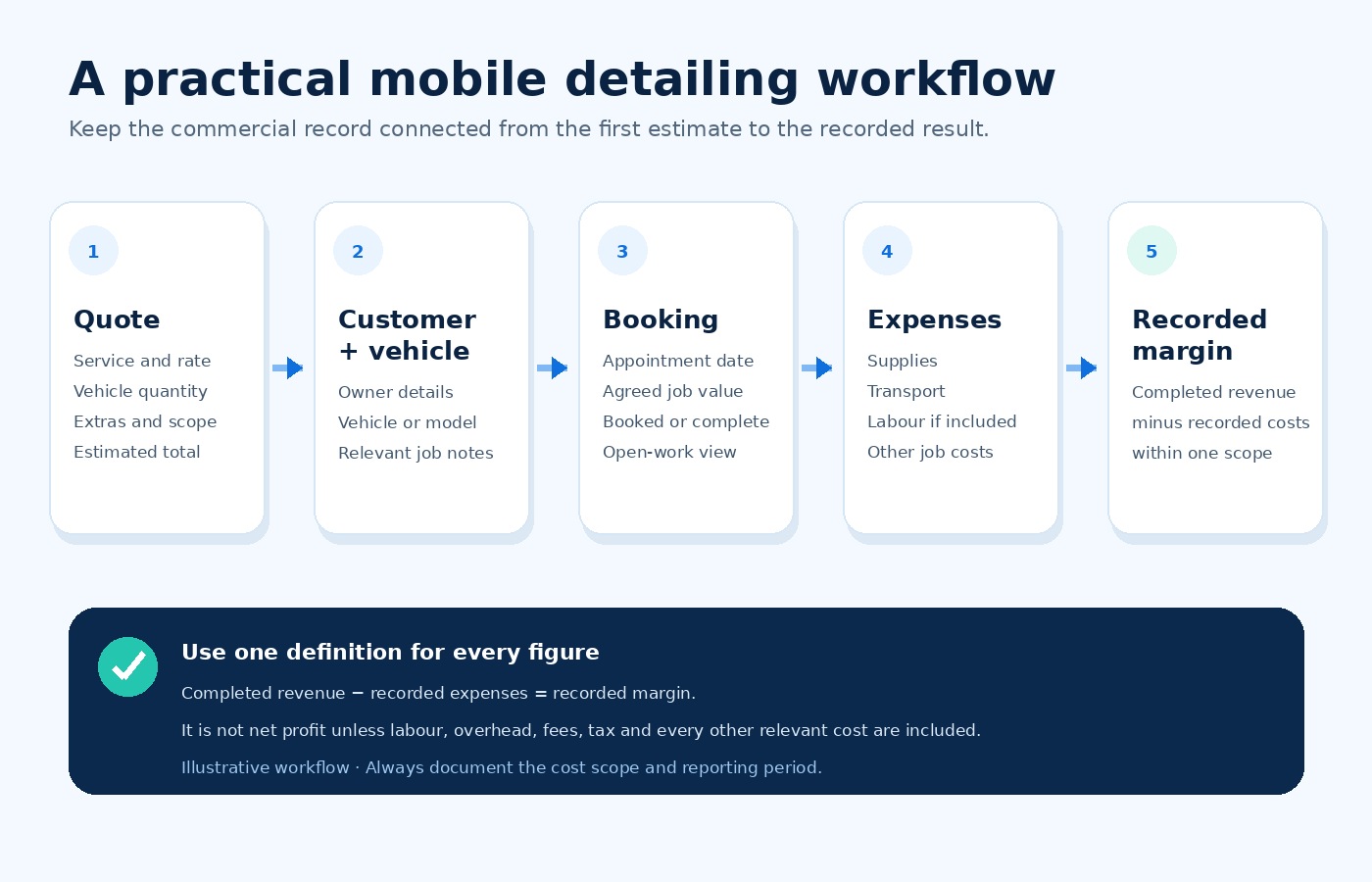
| Record | Minimum useful information | Decision it supports |
|---|---|---|
| Estimate | Service, rate, quantity, extras, scope and exclusions | What exactly are you offering and at what price? |
| Customer and vehicle | Customer identity, vehicle/model and relevant job notes | Which vehicle belongs to which customer and request? |
| Appointment | Date, job value and current status | What is booked, completed or still open? |
| Expense | Description, amount, date and job or period | What did the work consume? |
| Result | Completed revenue, included costs and calculation scope | What remains before excluded overhead, labour and tax? |
Therefore, these records do not need to become a complicated enterprise system on day one. However, they should use consistent definitions. If one screen counts booked value while another counts only paid or completed revenue, the labels must make that difference obvious.
Start with a detailing estimate that can survive real questions
A quote is more useful when it makes the calculation and scope visible. At minimum, record the selected service, rate per vehicle, number of vehicles and agreed extras. Next, add the condition assumptions, exclusions and validity period outside the arithmetic when they affect the offer.
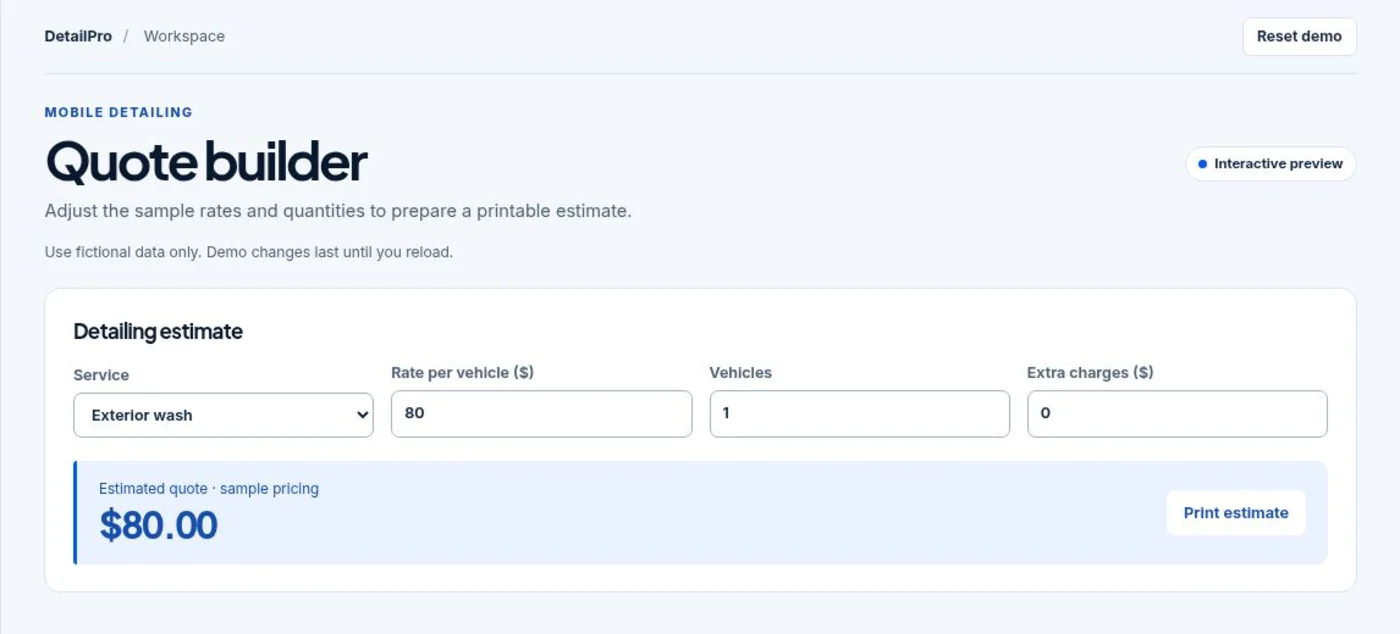
For example, the current DetailPro demo provides three sample services: exterior wash, full detail and ceramic coating. Visitors can change the sample rate, quantity and extra charges. The total follows this simple formula:
Estimated quote = service rate × number of vehicles + extra charges.
| Illustrative input | Value | Why it must be explicit |
|---|---|---|
| Service | Full detail | Identifies the package being priced. |
| Sample rate | $180 per vehicle | Separates the unit rate from the final total. |
| Vehicles | 2 | Prevents a multi-vehicle request from being priced as one unit. |
| Extras | $25 | Records agreed work outside the base package. |
| Estimated total | $385 | Equals $180 × 2 + $25. |
Importantly, those figures illustrate the calculation; they are not suggested market rates. The DetailPro quoting guide also notes that a real quotation needs an agreed scope, inspection and exclusions.
Price the work, not just the package name
Two vehicles can require the same named package but very different labour, supplies or preparation. Vehicle size, condition, pet hair, contamination, travel and access can all change the real workload. Therefore, a fixed package price should not stop the operator from documenting the conditions behind it.
After estimating the direct cost, use the Artsians Profit Margin and Markup Calculator to compare selling price, gross profit, margin and markup. The tool does not add missing costs for you, so define labour, materials, travel, payment fees and tax treatment before relying on the result.
Keep the customer, vehicle and booking on one job record
Mobile work creates a particular organisation problem: the service happens away from a fixed desk. Meanwhile, a customer name in messages, a vehicle model in a notebook and an appointment in a separate calendar can easily drift apart. As a result, a shared record reduces that mismatch.
For each booking, capture the customer, vehicle or model, appointment date, agreed job value and status. Add contact details, service address, access notes and vehicle-condition evidence only when the system supports them and your privacy process justifies collecting them.
Use status as an operational fact
“Booked” and “completed” should change reporting, not merely the colour of a badge. A booked value represents scheduled work. Completed revenue represents work that reached the completion rule defined by the business. Paid revenue can be a third figure if payment status is tracked separately.
The DetailPro preview currently lets a visitor add a fictional booking and change its status in the register. Its overview separates open bookings from completed revenue. That is a useful distinction, although the preview does not present invoicing or payment collection as part of the current workflow.
Do not assume that an accepted quote becomes a booking automatically
In the current DetailPro preview, quote and booking views are separate. After testing an estimate, the visitor opens Jobs & customers to enter a fictional booking. Businesses that need online approval, automatic conversion, deposits or invoicing should treat those as separate requirements and verify them before choosing any product.
Record detailing expenses without calling every remainder profit
Revenue alone cannot show whether a job was economically useful. Therefore, at a minimum, record direct supplies and transport associated with the job or reporting period. Depending on the decision, the cost basis may also need owner labour, employee wages, equipment use, payment fees, insurance, marketing and overhead.
The DetailPro demo uses this calculation:
Recorded margin = completed revenue − recorded expenses.
Suppose a completed full-detail job records $180 of revenue, $40 of supplies and $20 of transport. The recorded margin is $120. Yet that amount is not necessarily net profit because the example has not included labour, vehicle depreciation, insurance, payment fees, overhead or tax.
| Figure | Illustrative amount | Interpretation |
|---|---|---|
| Completed revenue | $180 | Value attached to work treated as complete. |
| Supplies | $40 | Recorded chemicals and consumables. |
| Transport | $20 | Recorded travel cost for the example. |
| Recorded margin | $120 | $180 − $60; not automatically net profit. |
The U.S. Small Business Administration advises businesses to account for revenue and expenses, maintain proper bookkeeping and understand their finances. Consequently, a lightweight operational dashboard should support—not replace—complete accounting records and professional advice where required.
Match the cost scope to the decision
For daily pricing, direct labour, materials and travel may be the first priority. For a monthly business review, add software, advertising, insurance, equipment, admin time and other overhead. For tax or formal financial reporting, use the applicable accounting rules and a qualified professional rather than an informal dashboard calculation.
What does the DetailPro demo currently include?
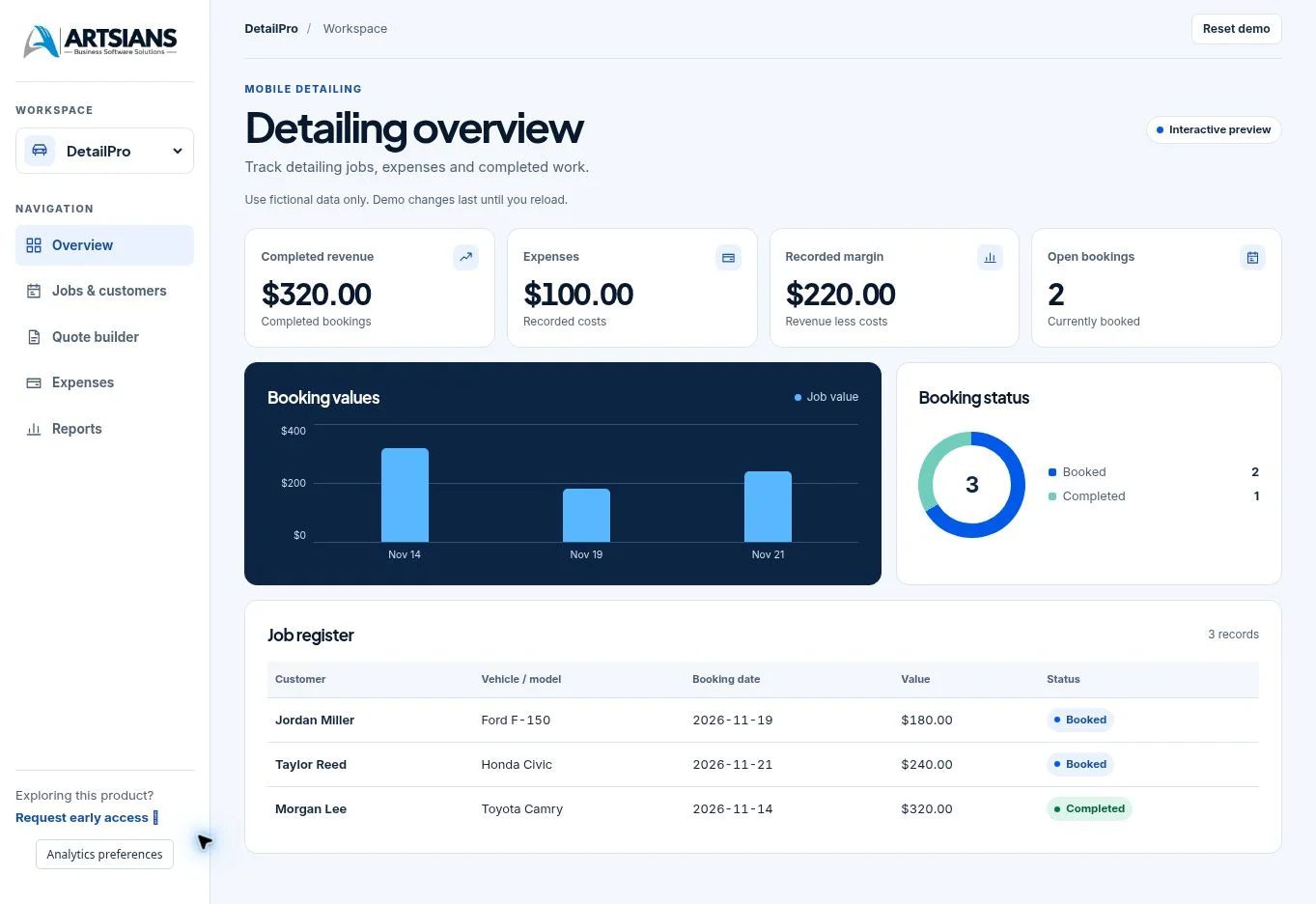
DetailPro is Artsians’ mobile detailing business software concept. In addition, the public preview uses fictional sample records and allows visitors to explore five modules. It is designed to show the workflow, not to imply that a visitor is viewing a live customer account.
| Demo module | What you can test | Important boundary |
|---|---|---|
| Overview | Completed revenue, expenses, recorded margin, open bookings, booking values, status and job register | All values are fictional sample data. |
| Jobs & customers | Add a fictional customer, vehicle/model, date and job value; change booking status | Do not enter real personal or customer information. |
| Quote builder | Choose a sample service; adjust rate, quantity and extras; print an estimate | Sample rates are illustrative, not market guidance. |
| Expenses | Add a fictional description and amount; review the register | The result depends on which costs are recorded. |
| Reports | Review revenue, expenses and margin; download sample JSON records | The preview does not represent formal accounting statements. |
What does early access mean here?
DetailPro is not currently offered as a completed purchase. The product page shows a proposed one-time price of $49 USD and asks whether the visitor would consider buying at that price. No payment is collected. Release timing, final terms and device compatibility are still being evaluated.
That wording matters. A demo can prove that the current preview behaves in a particular way, but it cannot prove final release scope, compatibility or support. Review the latest DetailPro product page before making a purchase decision.
How should you compare mobile detailing software?
Start with the jobs you perform today, not the longest feature list. Published detailing products commonly cover quoting, scheduling, customer records and invoicing. More advanced systems may add online booking, routing, payments, automated reminders, VIN lookup, inspection photos, quality checklists, team controls and accounting integrations.
For example, Jobber’s published auto-detailing workflow includes quoting, scheduling, invoicing, customer communication and payments. Meanwhile, Mobile Tech RX highlights estimates, VIN scanning, previous-damage documentation and quality checklists. Similarly, Housecall Pro describes online booking, scheduling, routing, invoicing and team use. These examples show possible evaluation categories; they do not make every feature necessary for every operator.
| Requirement | Ask before choosing | Current DetailPro preview |
|---|---|---|
| Quoting | Can I change service, unit rate, quantity and extras, then share or print the result? | Demonstrated with sample pricing and a print action. |
| Customer and vehicle records | Can I find the customer, vehicle and work history together? | Customer, vehicle/model, date, value and status are demonstrated. |
| Booking workflow | Do approved quotes become bookings automatically? | Quote and booking views are separate in the current preview. |
| Costs and reporting | Can I define included costs and export the record? | Expense entry, recorded margin and sample JSON export are demonstrated. |
| Payments and invoicing | Can customers approve, pay a deposit and receive an invoice? | Not presented in the current public preview. |
| Field operations | Do I need routing, mileage, reminders, inspections or photo evidence? | Not presented in the current public preview. |
| Team and integrations | Do I need multiple users, permissions, payroll or accounting sync? | Not presented in the current public preview. |
| Compatibility and support | Which devices, browsers, regions and support terms are confirmed? | Final device compatibility and terms are still being evaluated. |
When a simpler system can be the better test
A solo operator may not need dispatch, route optimisation, a customer portal and ten integrations immediately. Extra features can add cost and setup work without fixing the current bottleneck. If the main problem is scattered estimates, bookings and costs, test that smaller workflow first.
Conversely, simplicity becomes a limitation when several technicians need permissions, customers expect online approval and payment, or the business depends on automated reminders and route planning. In that case, compare full released products and verify the required features in the exact plan being considered.
How to test DetailPro in about 10 minutes
- Open the overview. Note the difference between completed revenue, recorded expenses, recorded margin and open bookings.
- Build a sample quote. Choose a service, change the rate, enter more than one vehicle and add an extra charge.
- Print or preview the estimate. Check whether the output makes the service, quantity, rate and total understandable.
- Add a fictional booking. Enter a made-up customer, vehicle/model, date and value. Never enter a real customer’s data in the public demo.
- Change the job status. Observe how moving a booking to completed affects the overview figures.
- Record a fictional expense. Add a sample supply or transport cost and check the change in recorded margin.
- Open reports. Review revenue, expenses and margin, then inspect the sample export option.
- Finally, reset or reload. Clear your demo changes before leaving.
During the test, write down what the preview solves and what your business would still need. That gap list is more useful than deciding from appearance alone.
Use a fictional test case with realistic complexity
A single exterior wash with no extras will confirm the arithmetic, but it will not test the workflow properly. Try two vehicles, one extra charge, a later booking date, at least one expense and a status change. Then ask whether the information stays clear when you move between screens.
Should you register interest in DetailPro?
Therefore, consider registering if you are a solo detailer or small mobile detailing business, the quote-to-margin workflow matches a real need, and you understand that the product is still being evaluated. The registration asks whether you would consider buying at the proposed $49 one-time price; it does not create a purchase.
Wait or compare other options if you need a released system now, confirmed device compatibility, payment processing, invoicing, route management, automated customer messages, inspection documentation, multi-user permissions or accounting sync. Those needs are not demonstrated in the current public preview.
Frequently asked questions
What is mobile detailing software?
Mobile detailing software is a system for organising customer and vehicle records, estimates, bookings, job status, expenses and business reporting. More advanced products may also add online booking, route planning, payments, reminders, inspection photos, team permissions and accounting integrations. The required feature set depends on the size and workflow of the detailing business.
Can I try DetailPro before registering interest?
Yes. Artsians provides a free interactive DetailPro demo with fictional sample data. Visitors can explore the overview, jobs and customers, quote builder, expenses and reports without entering real customer information. Demo changes last until the page is reloaded, and the workspace includes a reset control.
Is DetailPro available to buy today?
No. DetailPro is currently in early-access validation. The product page invites purchase interest but does not collect payment. Artsians says release timing, final terms and device compatibility are still being evaluated, so visitors should treat the current page and demo as a preview rather than a released product.
How much is DetailPro expected to cost?
The DetailPro page shows a proposed one-time price of $49 USD. This is not a final sale price, and no payment is collected during early-access registration. Final pricing and terms should be confirmed on the product page when the software is released.
What can the DetailPro quote builder calculate?
The current demo lets a visitor choose a sample exterior wash, full detail or ceramic coating, then adjust the rate per vehicle, number of vehicles and extra charges. It calculates an estimated total and provides a print-estimate action. The sample rates illustrate the calculation and are not recommended market prices.
Does recorded margin mean net profit?
No. In the DetailPro demo, recorded margin is completed revenue minus recorded expenses. It is only as complete as the costs entered and may exclude owner labour, payroll, insurance, depreciation, payment fees, overhead and tax. Use complete bookkeeping and professional accounting advice for formal financial decisions.
Does DetailPro connect a quote directly to a booking?
Not in the current public preview. The quote builder and booking views are separate. After testing an estimate, the visitor opens Jobs and customers to add a fictional booking. Businesses that require automatic quote approval, conversion, deposits or invoicing should verify those capabilities before choosing a system.
Who should consider the current DetailPro preview?
The preview is most relevant to solo detailers and small mobile detailing businesses that want to test a simple workflow for estimates, customer and vehicle records, bookings, expenses and recorded margin. Larger teams or businesses needing routing, payments, automated messaging, inspection documentation, multi-user controls or accounting integrations should compare those requirements separately.
Sources and review notes
- Artsians: DetailPro product page — current positioning, proposed price, early-access terms and product workflow; checked 18 November 2026.
- Artsians: DetailPro interactive demo — current modules and fictional sample workflow; checked 18 November 2026.
- Artsians: DetailPro quoting workflow — sample estimate calculation and limitations; checked 18 November 2026.
- U.S. Small Business Administration: Manage your business — bookkeeping and finance context.
- Jobber: Auto detailing software — published quoting, scheduling, CRM, invoicing and payment categories.
- Mobile Tech RX: Detailing business software — published estimate, VIN, damage-documentation and checklist capabilities.
- Housecall Pro: Auto detailing software — published booking, scheduling, routing, invoicing and team-use categories.
Product features, pricing, release status and compatibility can change. Recheck the official DetailPro page before publication and whenever early-access terms change. This article explains an operational workflow; it is not accounting, tax or legal advice.
Comments