
To prevent double bookings in a small party rental business, every promise must be checked against one dated inventory record before the customer receives a final yes. That record needs more than an event date. It must show the item, quantity, full out-and-back window, booking status, active holds, damage or maintenance blocks, and enough turnaround time to prepare the item again.
A shared calendar can show two Saturday events, but not whether 70 of 120 chairs are confirmed, 30 are held, five are damaged and five form a buffer. This guide builds a control process for spreadsheets or rental software.
Why do party rental double bookings happen?
A double booking is usually a process failure, not one careless employee. Two people make promises from records that were accurate at different moments. An inquiry, quote, deposit and calendar event may live in separate places; none alone shows the complete commitment.
Small operators are especially exposed because one person may answer calls, prepare quotes, load equipment and collect returns. During a busy weekend, memory becomes the connection between separate tools. Common causes include:
- A quote is treated as a promise but does not reduce availability.
- A calendar records the event name without item quantities or return time.
- Website requests and phone bookings use separate records.
- A package reserves its headline item but not the chairs, linens or accessories inside it.
- Returned items look available before they are counted, cleaned or inspected.
- Damaged, missing or subrented items remain inside the normal owned quantity.
- A staff member overrides a warning without recording how the shortage will be covered.
The remedy is not simply “be more careful.” To prevent double bookings, define the exact point at which a customer request becomes an inventory commitment.
Define availability as a dated, usable quantity
“We own 120 chairs” is an inventory count. “Ten chairs are safe to promise from Friday at 2 p.m. until Monday at noon” is an availability answer. A useful answer has four parts:
- Item level: identify the exact pool or individually tracked unit.
- Quantity: subtract every commitment and unavailable unit.
- Time window: include preparation, dispatch, event, collection and return work.
- Condition: count only items ready—or scheduled to be ready—before dispatch.
This is consistent with how established rental systems describe availability. Booqable defines it from inventory, reserved items and optional buffer time, while Goodshuffle Pro separates inventory shortages from logistical conflicts across overlapping events. The exact software behavior varies, so the owner must define the business rule before configuring a tool.
Use one source of truth for every channel
Phone calls, social messages, website forms and walk-ins may remain separate customer channels. The commitment record cannot. As soon as a request becomes serious enough to quote, enter it into the same working system used for every other event.
At minimum, each event record should contain:
- Customer, event and venue details.
- Delivery or pickup, event, return and inspection times.
- Every rental item, variation, package component and quantity.
- Status, hold expiry and confirmation evidence.
- Delivery, setup, pickup, crew and recorded payment notes.
- Any documented shortage plan, substitute or subrental.
If a spreadsheet is the source of truth, protect its structure. Use one row per event-item combination or another model that can calculate quantities by date range. A colorful monthly calendar plus free-text notes is easier to read, but it is not enough for quantity-based availability.
Separate inquiries, quotes, holds and confirmed reservations
Not every customer conversation should block stock. However, a customer who was explicitly promised a date must not disappear from the availability check. Create statuses with one written rule for whether each status reduces availability.
| Status | Does it reduce availability? | Control rule |
|---|---|---|
| Inquiry | No | Collect dates, items and quantities before promising stock. |
| Draft quote | Normally no | Show that availability is not guaranteed until the stated next step. |
| Tentative hold | Yes, until expiry | Record who approved it, what it covers and when it releases. |
| Confirmed reservation | Yes | Keep customer acceptance and required deposit or approval evidence. |
| Out / in use | Yes | Do not release merely because the event has ended. |
| Returned—inspection pending | Yes | Count, inspect and clean before marking ready. |
| Ready / closed | No | Return the verified quantity to availability. |
Vendor workflows illustrate why this decision matters. In Booqable, items on a draft order remain available, while reserving the order blocks the selected quantity or stock item for that rental period. Your policy may differ, but customers and staff should never have to guess when a quote becomes a hold.
Check the full rental window—not only the party date
A Saturday event may consume inventory from Friday afternoon through Monday morning. Before delivery, the team may need to pull, test and load equipment. After collection, items may need cleaning, drying, charging or inspection.
Record the operational start and safe-next-available time, then check every overlapping commitment. Avoid one universal buffer: a chair may need a quick inspection, while a wet tent may need much longer. Booqable’s downtime feature, for example, blocks products for maintenance, repair or missing-item periods. The same principle belongs in any record.
Crew and transport can also create conflicts. Inventory may be available while the only delivery vehicle or setup team is already committed. Treat capacity as a second approval check rather than pretending item availability confirms the whole event.
How to prevent double bookings with a safe-to-promise formula
For quantity-based items such as chairs, linens or dinnerware, calculate:
Safe-to-promise quantity = owned quantity − confirmed quantity − live holds − unavailable quantity − operating buffer.
Add verified external supply only after the subrental is confirmed for the correct dates and recorded as external. Do not temporarily increase the owned quantity. The distinction matters after that rented supply goes back to its vendor.
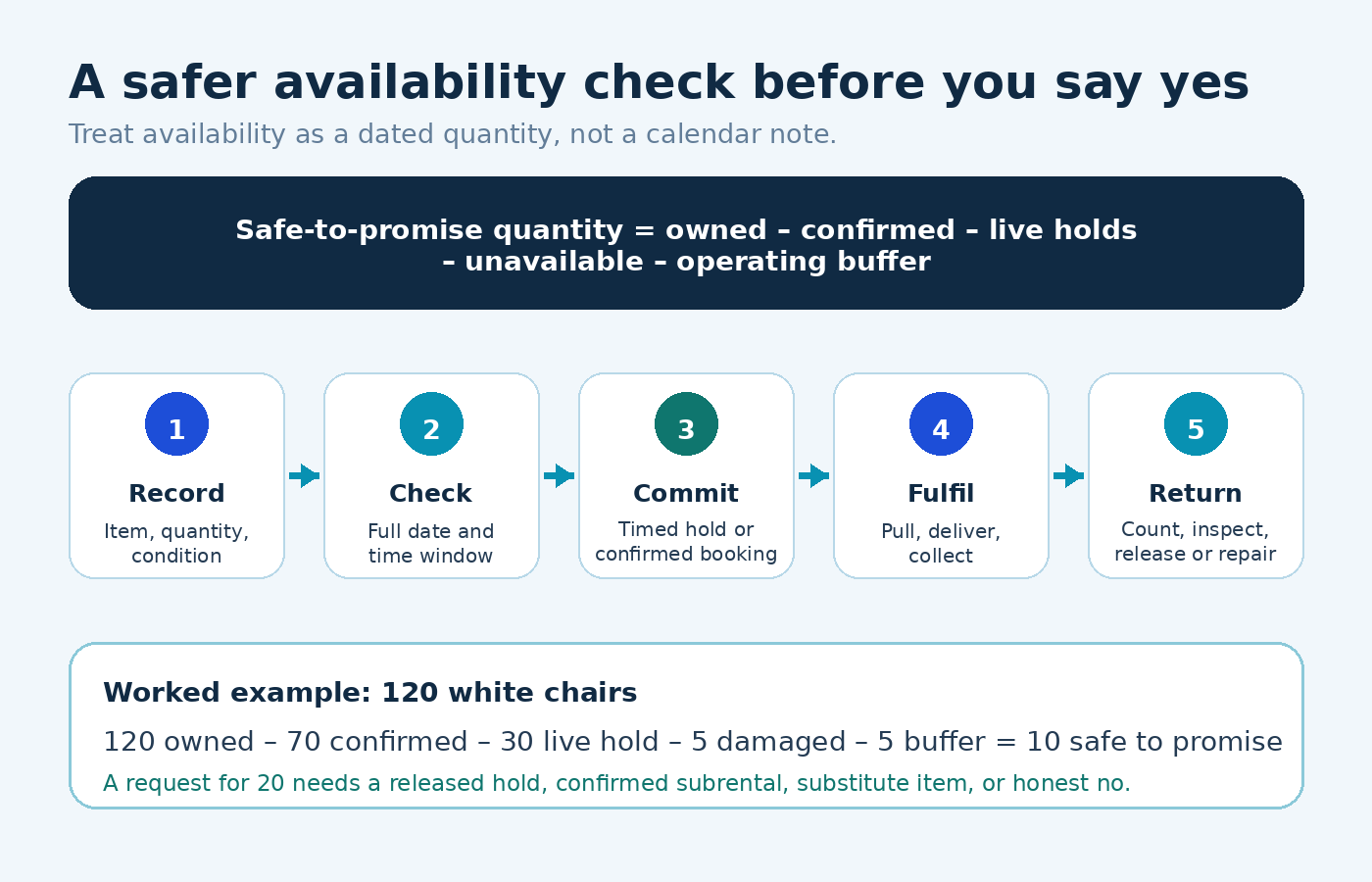
Worked example: 120 white folding chairs
Suppose Event A has 70 confirmed chairs, Event B has a valid hold on 30, five chairs are damaged, and the owner keeps five as a practical buffer. The safe-to-promise quantity is 10. A new request for 20 is not available as currently recorded.
The owner can ask whether the earlier hold will be released, offer another chair style, confirm a ten-chair subrental, change the time window, or decline. Quietly accepting the order and hoping some units return early transfers a visible shortage into a customer-facing failure.
Control packages, substitutions, damage and subrentals
Packages must reserve their components
A “backyard party package” may include one tent, six tables, 48 chairs, lighting and setup. Availability must be checked for every component. Otherwise, selling two packages may overbook the shared chairs even when two tents exist.
Substitutions need customer approval
Do not treat similar stock as interchangeable without approval. Record the agreed variation and update both the customer document and load sheet.
Damage and missing items reduce availability immediately
Move affected units into an unavailable status at return inspection. A verbal “three chairs need repair” note is easy to lose before the next quote. Goodshuffle Pro’s help documentation likewise treats set-aside inventory as unavailable when calculating conflicts.
Subrentals should be a separate supply record
Record the supplier, confirmed quantity, collection window, return obligation and cost. If the vendor has not confirmed, the shortage is unresolved. A hopeful phone conversation is not inventory.
Run a short daily double-booking prevention routine
- Morning exception review: inspect new inquiries, expiring holds, overdue returns, damage blocks and unresolved shortages.
- Pre-quote check: check requested quantities across the complete operational window before sending availability language.
- Commitment update: convert a hold or quote to confirmed status as soon as the agreed condition is met.
- Change control: rerun availability when dates, quantities, packages or substitutions change.
- Load-out reconciliation: compare the pull list with the confirmed booking and record anything short or substituted.
- Return reconciliation: count what came back, record damage or missing units, then release only ready stock.
Assign one person to own the final commitment decision on each shift. Only an authorized role should accept a conflict override, with a reason and supply plan visible to fulfillment staff.
What to do after a double booking is discovered
Freeze changes, identify the earliest explicit promises, verify approved substitutes or external supply, and contact affected customers with concrete options. Then document the failure point—status, dates, quantity, return or override—and correct that control.
When should a small party rental business use software?
A controlled spreadsheet can work when one person handles a small catalog and few overlapping events. It becomes risky when several people can promise stock, many identical units move across events, packages share components, returns arrive in batches, or website and phone requests overlap.
| Question | A manual system may still work | Software becomes more valuable |
|---|---|---|
| Who confirms bookings? | One owner | Owner, office staff and online channel |
| How is stock tracked? | Few single units | Large pools, variants and packages |
| How often do dates overlap? | Occasional events | Several jobs across the same weekend |
| How are changes handled? | Owner updates one file immediately | Multiple people change quotes, dates and quantities |
Software helps prevent double bookings only when inventory, packages, status rules and returns are accurate. Test real historical scenarios before depending on it for customer promises.
How RentPro should be evaluated for this workflow
RentPro by Artsians is currently an early-access interactive demonstration, not finished commercial software. Owner-supplied material reviewed in November 2026 showed a proposed $59 USD one-time price and demonstration modules for equipment availability, overlapping-booking conflict detection, rental estimates and financial reports. Final price, release timing, production scope, license terms and device compatibility remain unconfirmed.
The demonstration is useful for evaluating the basic idea: connect equipment records, a requested event window and existing bookings before sending a rental estimate. It must not be treated as proof of production hosting, advanced inventory, live payments, permanent centralized storage, multi-user synchronization, backups, integrations or equivalent capability to established rental platforms.
Use the product page to review the early workflow and give feedback. Before operational use, verify how it stores data, handles simultaneous users, recovers backups, records returns, manages packages and behaves when two people edit at once.
Double-booking prevention checklist
Use this final check to prevent double bookings before the next busy weekend:
- One current source of truth covers phone, website, social and walk-in requests.
- Every item has an owned quantity, tracked variation and condition.
- Each booking uses the full operational window, not only the event date.
- Inquiry, quote, hold, confirmed, out, returned and unavailable statuses have written rules.
- Every hold has a clear expiry and releases automatically or through a daily review.
- Packages reserve all inventory components.
- Damage, maintenance and missing items reduce availability immediately.
- Subrentals remain separate from owned stock and require supplier confirmation.
- Date or quantity changes trigger a new conflict check.
- Every override records an owner, reason and supply plan.
- Return counts and condition are reconciled before stock becomes ready.
Frequently asked questions
What is a double booking in a party rental business?
A double booking happens when the business promises more of an item than it can safely supply during overlapping operational windows. It can involve one unique item, a quantity pool, a package component, a delivery vehicle or setup capacity. The conflict may begin at a quote or verbal promise even before the second order is marked confirmed.
Can Google Calendar prevent party rental double bookings?
A calendar can show event times, but it normally does not calculate quantity-based availability, package components, damaged stock, tentative holds or turnaround buffers. It may support a very small operation when paired with a controlled inventory record. Once several events share the same item pools, a calendar alone becomes a weak source of truth.
Should a quote reserve rental inventory?
Only if the business has promised to hold the items. A price-only draft can leave stock available, while a genuine tentative hold should reduce availability until a stated expiry. Write the rule clearly on the quote so the customer knows whether inventory is protected and what action confirms the reservation.
How long should a tentative rental hold last?
There is no universal duration. Set a period that fits demand, event lead time and the customer’s next action, then display the exact expiry. High-demand weekend stock may need a shorter hold than an off-season item. Review or release expired holds promptly so old possibilities do not block genuine customers.
How do I calculate available rental quantity?
Start with owned quantity, then subtract confirmed reservations, active holds, damaged or missing units, maintenance blocks and any operating buffer across the requested window. Add external supply only after a subrental is confirmed and recorded separately. Recalculate immediately after every material change to dates, quantities, status or recorded item condition.
What if returned items are needed for another event?
Build enough time for unloading, counting, cleaning, drying, charging, inspection and repair before the next promise. Mark the items ready only after that work is complete or reliably scheduled. If the turnaround is uncertain, offer another item, adjust the event plan or arrange confirmed external supply instead of assuming an early return.
Will party rental software guarantee no double bookings?
No. Software can calculate overlaps and warn about shortages, but it depends on correct inventory, package setup, booking statuses, date ranges and return updates. It may also need clear rules for holds and manual overrides. Test conflict scenarios and train staff before relying on any system for accurate customer-facing availability.
Is RentPro ready to run a live rental business?
No. RentPro is currently an early-access interactive demonstration, not finished commercial software. Its visible workflow can help an owner assess equipment availability, conflict detection, rental estimates and reports. Production storage, payments, backups, multi-user behavior, integrations, support arrangements, data export, final pricing and release terms require independent confirmation before operational use.
Sources and verification
- Booqable order workflow — draft, reserved, picked-up and returned status behavior; checked November 21, 2026.
- Booqable glossary — availability, rental period, buffer and shortage definitions; checked November 21, 2026.
- Booqable product downtime — maintenance, repair and missing-item blocks; checked November 21, 2026.
- Goodshuffle Pro item conflicts and date-range availability — checked November 21, 2026.
- RentPro product page and owner-supplied early-access materials — reviewed November 2026; recheck immediately before publication.
Editorial note: Software interfaces and product status can change. The worked chair example is illustrative. Adapt holds, deposits, contracts, taxes, safety checks and rental terms to the business and local requirements.
Comments