



Old posts often contain useful ideas, links and search history, yet their facts, examples, structure or search fit can weaken over time. A productive refresh starts with evidence. Google Search Console shows which pages and queries changed, while AI can help organise that evidence and draft improvements for a human editor to verify.
This guide explains how to refresh old blog posts without replacing useful material blindly. You will learn how to choose candidates, diagnose the likely problem, decide whether to keep, update, consolidate or retire a page, and measure the result without treating every traffic movement as proof that the edit worked.
Which old blog posts should you refresh?
Begin with pages that still serve a real reader need and show evidence of demand or historical value. Age alone is a weak selection rule. A three-year-old evergreen explanation can remain accurate, while a six-month-old tool comparison can already be outdated.
Build a candidate list from your content inventory and Search Console. Strong candidates usually have one or more of these signals:
- Clicks or impressions fell across a meaningful, comparable period.
- Impressions remain substantial while CTR declined.
- The page appears for relevant queries that it answers only briefly.
- The topic still matters, but prices, screenshots, laws, product features, links or examples have changed.
- Several pages compete for the same intent and divide internal links or useful material.
- The post attracts readers but sends them toward an expired offer or an unclear next step.
Do not place every declining URL in the refresh queue. Traffic can fall because search demand changed, a seasonal period ended, a technical issue affected the site or the page no longer deserves to exist. The diagnosis should determine the action.
Step 1: record the Google Search Console baseline
Open Search Console, select Performance, choose Search results, and add an exact page filter for the URL. Select clicks, impressions, average CTR and average position. Export the page and query data before editing so you can reproduce the baseline later.
Compare periods that answer the same question
For a recent change, compare the last 28 days with the previous 28 days. For seasonal topics, compare the current period with the equivalent period one year earlier. Google recommends weekly or monthly aggregation when day-of-week differences would distort a daily comparison. Include enough context to see whether the movement is a short fluctuation or a sustained pattern.
| Baseline field | What to record | Why it matters |
|---|---|---|
| URL and canonical | Exact live URL and preferred canonical URL | Prevents measurement from mixing duplicate versions. |
| Date ranges | Current, previous and year-over-year periods where useful | Makes the comparison repeatable and exposes seasonality. |
| Core metrics | Clicks, impressions, CTR and average position | Separates demand, visibility and click-behaviour changes. |
| Dimensions | Queries, pages, countries, devices and search appearances | Shows whether the movement is concentrated in one segment. |
| Business outcome | Leads, sales, signups or another relevant page goal | Keeps the refresh connected to reader and business value. |
| Change log | Publication date, refresh date and exact edits | Helps align performance changes with editorial work. |
Search Console tables may omit anonymised queries, and filtering can make totals differ from the chart. Treat an export as a decision aid rather than a complete record of every search. Average position is also the average topmost position for your property in the selected view. Google advises focusing more on impression and click trends than on position alone.
Step 2: diagnose why performance changed
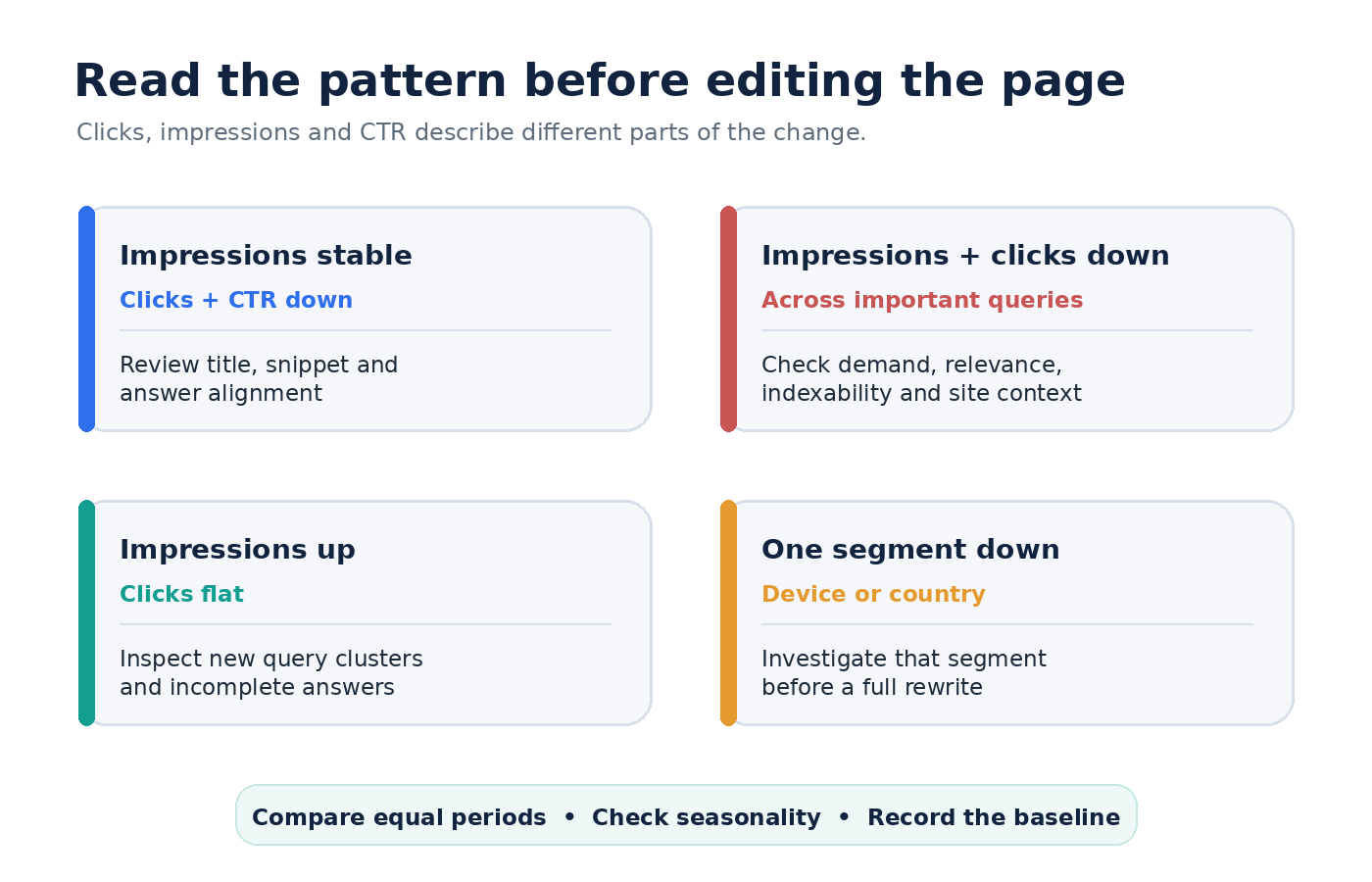
A traffic drop is a symptom. Read the metrics together before you edit the article.

| Observed pattern | Possible explanation | Next check |
|---|---|---|
| Impressions stable, clicks and CTR down | The title, snippet or visible answer may be less compelling for current queries. | Compare high-impression queries, title wording, snippet text and current result formats. |
| Impressions and clicks down together | Demand, visibility, relevance or indexability may have changed. | Check year-over-year demand, query groups, URL Inspection and sitewide trends. |
| Impressions up, clicks flat | The page may be reaching broader queries that it does not yet satisfy well. | Review new query clusters, CTR by query and whether the page should answer them. |
| Desktop stable, mobile down | Presentation, page experience or result mix may differ by device. | Inspect the mobile page, layout, speed, intrusive elements and device query mix. |
| One country down, others stable | Local demand, language, competition or relevance may have shifted. | Compare country filters and confirm the content serves that market accurately. |
| Organic traffic down across many URLs | A sitewide technical, demand or search-system change may be involved. | Investigate indexing, releases, migrations, security and sitewide performance before rewriting pages. |
Review the live page after the data. Check the accuracy of claims, the completeness of the answer, the quality of sources, the clarity of headings, internal links, image usefulness, accessibility, conversion path and whether the article still matches the queries that bring impressions. Search the page for dates, prices, percentages, product names and external links because those elements commonly become stale.
Step 3: give the URL one editorial verdict
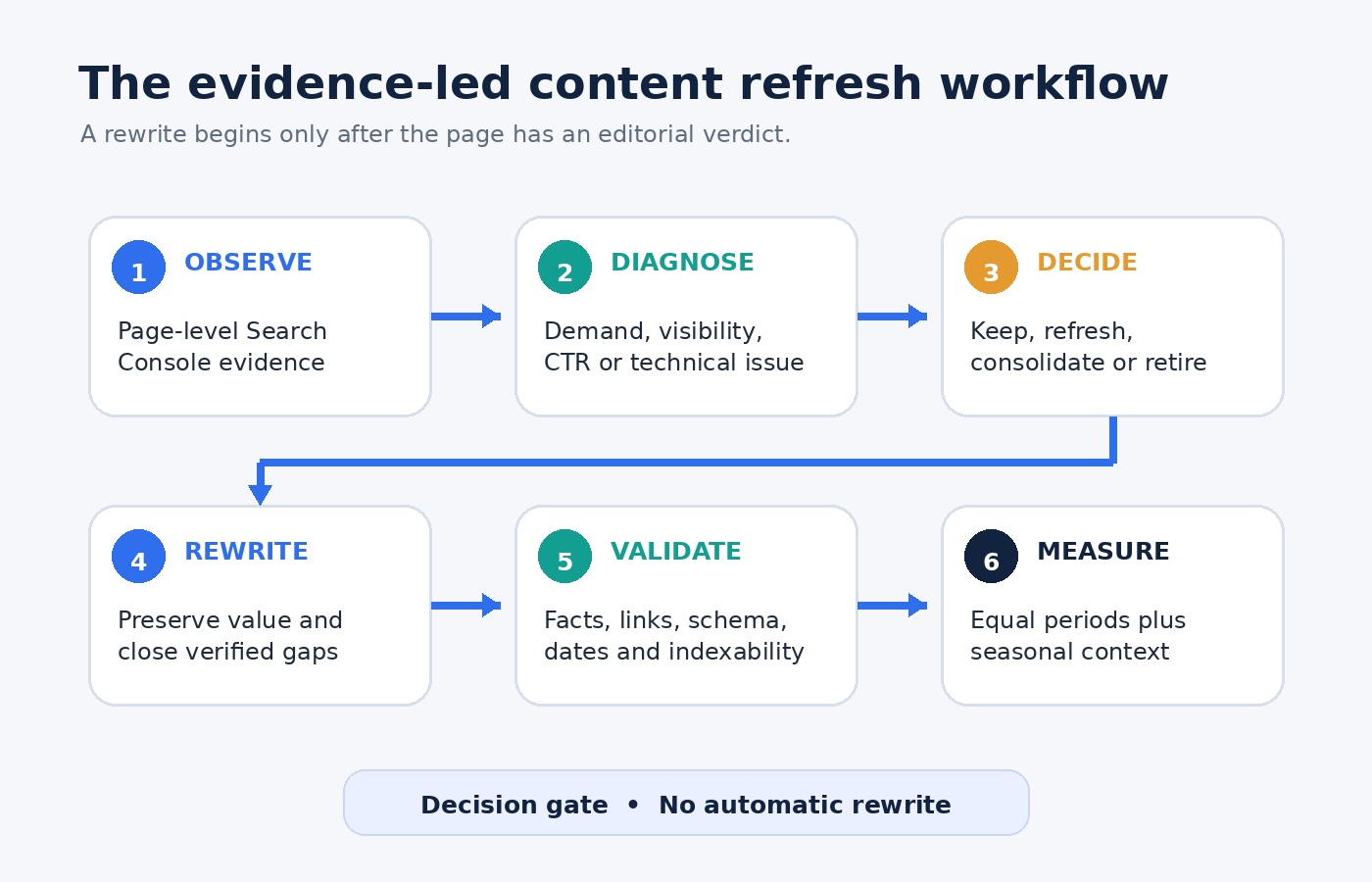
The Artsians refresh decision workflow prevents a team from rewriting pages automatically. It separates four actions according to reader value, topic fit and overlap.
| Verdict | Use it when | Required action |
|---|---|---|
| Keep | The article remains accurate, useful and aligned with its queries. | Fix only genuine defects, document the review and monitor it. |
| Refresh | The same URL and intent remain valuable, but information or presentation is weaker. | Preserve strong material, update weak sections and improve the reader journey. |
| Consolidate | Two or more pages serve substantially the same intent and each holds useful material. | Choose one destination, merge unique value, redirect retired URLs and update internal links. |
| Retire | The content has no continuing reader purpose, replacement or meaningful demand. | Remove it cleanly, return an appropriate status and repair internal links. |
A fifth outcome can be a new article when the query reflects a distinct intent that would make the original page confusing. Link the two pages clearly and define separate purposes. Avoid forcing every related query into one oversized guide.
Step 4: use AI as an editorial assistant
AI is most useful after the editor supplies evidence. Give it the current article, selected Search Console queries, a list of verified sources, audience details and the editorial verdict. Ask it to analyse and propose changes before asking it to rewrite.
Good AI tasks during a refresh
- Cluster exported queries by intent without inventing search volume.
- Map query groups to the sections that currently answer them.
- Identify unsupported claims, vague passages and missing definitions for review.
- Propose an outline that preserves strong original examples.
- Generate title and meta-description alternatives grounded in the visible page.
- Convert verified information into a comparison table, checklist or FAQ draft.
- Check whether FAQ schema wording matches the visible questions and answers.
Human checks that remain essential
Google says generative AI can help with research and structure, while automatically produced content still needs accuracy, quality and relevance. Manually fact-check AI output, including titles, descriptions, structured data and image alt text. Models can produce plausible details that are incorrect or unsupported.
Remove confidential customer information, unpublished commercial data and personal identifiers before sending material to an AI service. Confirm the service’s current data controls and your organisation’s policy. Keep a record of which source supports each important claim.
Do not ask AI to make the article longer for its own sake. Google does not prescribe a preferred word count. The goal is a complete answer with useful original value, such as first-hand observations, a worked example, a decision framework or clearly documented methods.
Step 5: refresh the article in a controlled sequence
When the verdict is refresh, work from the highest-impact issue to the smallest editorial detail. This keeps the update focused on reader needs.
- Write a one-sentence refresh brief. State the audience, current problem, intended outcome and evidence for the change.
- Preserve proven value. Mark original examples, earned links, quotations, diagrams and explanations that remain accurate.
- Correct facts first. Replace outdated claims, dates, prices, screenshots, product names and broken sources.
- Fix intent and structure. Put a direct answer near the opening, group related ideas under descriptive headings and remove detours.
- Add missing decision support. Include constraints, trade-offs, steps, examples, tables or checks that help readers act.
- Improve internal links. Link to current supporting articles, tools and relevant commercial pages with descriptive anchors.
- Update visual evidence. Replace obsolete screenshots and add diagrams only where they reduce cognitive effort.
- Rewrite metadata after the body. The title and description should represent the finished page and its real query fit.
- Recheck the next step. Make the call to action appropriate for the article’s audience and stage.
Use the Artsians SERP Title and Meta Description Preview to compare accurate title and description options. Search engines can generate different title links or snippets, so the preview is an editing aid. Use the Keyword Density Checker to find awkward repetition, then edit for clarity instead of targeting a percentage.
When you refresh old blog posts, keep the existing URL if the topic and canonical destination remain the same. Changing a useful URL adds redirect work, creates opportunities for broken links and complicates the before-and-after comparison.
Worked example: turn Search Console data into a refresh brief
Consider a hypothetical article called “Email Automation for Small Businesses.” The editor compares the latest 28 days with the previous 28 days.
| Metric | Previous period | Current period | Interpretation |
|---|---|---|---|
| Clicks | 420 | 310 | Traffic fell by 110 clicks. |
| Impressions | 18,000 | 19,500 | Visibility grew, so demand did not disappear in this view. |
| CTR | 2.33% | 1.59% | The page earned fewer clicks from more impressions. |
| Average position | 8.7 | 9.4 | The change is modest and should be read with query-level trends. |
The query export shows rising impressions for “email automation workflow” and “AI email automation,” yet the article contains only a short tool list. The title promises “best tools,” the screenshots are obsolete, and the introduction does not explain how to choose a workflow. The year-over-year comparison shows demand is stable.
The appropriate verdict is refresh. The brief is: “Preserve the current setup example, replace the outdated screenshots, lead with a workflow-selection answer, add a human-review checkpoint and update the title to describe the decision guide accurately.” An AI assistant can cluster the query export and draft a revised outline. The editor must verify product details, test every link and write the practical example from real experience.
This example does not predict a traffic gain. It demonstrates how clicks, impressions, CTR, queries and page evidence create a defensible editorial decision.
Step 6: validate and publish the updated post
Run editorial and technical checks before pressing Update. A substantial refresh can still fail readers if the page introduces broken links, inconsistent dates or unsupported schema.
- Verify every changed factual claim against a current primary source.
- Proofread the title, opening answer, headings, tables, captions and call to action.
- Test internal and external links and remove unnecessary tracking parameters.
- Confirm the canonical URL, indexability, mobile layout and image alt text.
- Validate structured data and ensure it describes visible content exactly.
- Check that the visible updated date and structured
dateModifiedagree. - Record the change date and the main edits in the measurement log.
Update the visible date only when the page changed substantially. Google explicitly warns against changing dates merely to make pages appear fresh. Its publication-date guidance says visible dates and structured data should be consistent and should describe the page’s real publication or update date.
After publication, inspect the URL in Search Console. Test the live page when you need to confirm that Google can fetch and interpret it, then request indexing for the changed URL when appropriate. A request places the page in an indexing queue. It does not guarantee indexing or search visibility. For a large set of updated URLs, maintain an accurate sitemap and lastmod values.
The Search Console “Refresh Outdated Content” removal tool serves a different purpose. It is designed to update results for content that has been removed from a page or page that no longer exists. It is not the normal submission route for a newly edited article that you own.
Step 7: measure the refresh without overclaiming
Measure the same URL, metrics, dimensions and date logic used in the baseline. Allow enough time for the page to be crawled and for the reporting period to contain meaningful data. The right observation window depends on search demand and traffic volume, so document the window rather than applying a universal number of days.
Use three comparison views
- Before versus after. Compare equal-length periods around the refresh, while noting any crawl and indexing delay.
- Year over year. Use the equivalent seasonal period when demand changes through the year.
- Page versus context. Compare the URL with similar pages or a sitewide trend to see whether the movement is isolated.
Check query groups, devices and countries as well as totals. A page can lose broad low-value impressions while gaining clicks for a commercially relevant query. Combine Search Console with the page’s business outcome, such as qualified leads, product signups or assisted conversions.
Google notes that page changes are difficult to evaluate causally because user interest, news, competitors and other events can change at the same time. Record conclusions as evidence-based observations. “Clicks increased after the refresh” is supportable. “The rewrite caused every additional click” usually is not.
Reusable AI prompts for a content refresh
Replace the bracketed fields with your own evidence. Remove confidential data and verify every output.
Query clustering prompt
Cluster the following Search Console queries by shared search intent. Use only the supplied queries and metrics. Do not invent volume, rankings or user motives that the data cannot support. Return a table with cluster, queries, total clicks, total impressions, weighted CTR, current page section and editorial question. Flag ambiguous queries separately. Data: [paste cleaned export].
Content-gap prompt
Compare this article with the supplied query clusters and verified sources. Identify which reader questions are answered fully, partly or not at all. Preserve accurate original examples. For every recommended addition, name the query evidence, reader benefit and source required. Do not draft unsupported facts. Article: [paste article]. Query clusters: [paste clusters]. Sources: [paste source list].
Refresh-outline prompt
Create a revised outline for [audience] whose goal is [goal]. Keep these proven sections: [list]. Fix these diagnosed problems: [list]. Put a direct answer near the opening, group related steps, add one worked example and finish with a practical next step. Explain what each section helps the reader decide.
Fact-check handoff prompt
Extract every factual claim, number, date, product feature and recommendation from this draft. Return a verification table with the exact claim, source already provided, verification status, freshness risk and required human action. Mark unsupported items clearly. Do not supply a source from memory.
Metadata prompt
Write five accurate SEO title and meta-description pairs for this finished article. Keep the focus on [primary topic] and the reader outcome [outcome]. Avoid superlatives, guarantees and keyword repetition. Each pair must reflect information visible in the article. Draft: [paste final text].
Run the final copy through the Artsians Word and Character Counter when an editorial field has a length constraint. Treat length as a production check. Clarity and accuracy remain the priority.
Content refresh checklist
- Choose a page because evidence supports a review.
- Export the Search Console baseline before editing.
- Compare previous and seasonal periods where relevant.
- Diagnose query, page, device and country patterns.
- Assign keep, refresh, consolidate or retire.
- Preserve accurate original value and useful links.
- Use AI for analysis and drafting with supplied evidence.
- Verify facts, metadata, schema and alt text manually.
- Change the visible date only after a substantial update.
- Log the release and measure the same URL responsibly.
How to refresh old blog posts: frequently asked questions
How do I find old blog posts that need updating?
Filter Search Console by page and compare equal date ranges. Look for meaningful changes in clicks, impressions and CTR, then review query, device and country segments. Add editorial signals such as outdated facts, broken links, weak examples and overlapping pages. Age alone is not enough.
Can AI refresh an entire article automatically?
AI can cluster queries, identify possible gaps, propose structure and draft copy, but an editor should verify every fact, source, example, title, description, schema field and image description. The strongest workflow gives the model evidence and uses its output as a reviewable draft.
Should I change the URL when I update an old post?
Keep the existing URL when the topic and canonical destination remain the same. If pages are consolidated, select one destination, redirect retired URLs and update internal links. A URL change should serve a clear information-architecture need.
Should I change the publication date after a refresh?
Use a visible updated date when the page changed substantially, and keep it consistent with structured data. Do not change the date solely to create an appearance of freshness. Preserve the original publication date when your system supports both fields.
How often should I refresh old blog posts?
Review content according to risk and evidence. Pages with changing prices, products, regulations or statistics need closer monitoring than stable evergreen explanations. Use Search Console trends, broken-link checks, business changes and reader feedback to trigger reviews rather than following one universal schedule.
What Search Console metrics matter most for a content refresh?
Read clicks, impressions and CTR together, then use average position as supporting context. Segment by query, page, device, country and search appearance. Connect search performance with the page’s real outcome, such as leads or signups.
Should I request indexing after updating a post?
You can inspect the changed URL, test the live page when needed and request indexing if the page is indexable. The request does not guarantee inclusion or a particular position. For many updated pages, keep the sitemap and last-modified values accurate.
How long does it take to see results after a refresh?
There is no universal observation period. Crawling, indexing, query demand and traffic volume vary. Record the publish date, watch the URL Inspection status and compare sufficiently large, equal periods with seasonal and sitewide context before drawing a conclusion.
Use evidence before editing
The safest way to refresh old blog posts is to separate diagnosis from rewriting. Search Console reveals where performance changed. The live article explains what readers currently receive. The verdict determines whether the right action is to keep, refresh, consolidate or retire.
AI can accelerate query clustering, gap analysis, outlining and drafting, while the editor remains responsible for evidence, accuracy and judgement. Preserve what already works, make a substantial update where readers need it, publish honestly and measure the same URL in context.
Sources and further reading
- Google Search Console Help: Advanced filtering and comparison
- Google Search Console Help: Performance report tasks and use cases
- Google Search Central: Debugging Search traffic drops
- Google Search Central: Creating helpful, reliable, people-first content
- Google Search Central: Guidance on generative AI content
- Google Search Central: Publication and update dates
- Google Search Console Help: Inspect and troubleshoot a page
- Artsians SERP Title and Meta Description Preview
- Artsians Keyword Density Checker
- Artsians Word and Character Counter


