

Quick answer: The best AI marketing setup for a small business in 2026 is usually a lean stack, not one expensive platform. Start with ChatGPT or Gemini for planning, Canva or Adobe Express for design, Buffer or Metricool for social publishing, Brevo or HubSpot for customer follow-up, and Zapier only when a repeated manual task is worth automating.
Small businesses do not need fifteen new subscriptions. They need a few reliable tools that remove specific bottlenecks without weakening brand voice, customer trust or financial control. This guide compares fifteen free and low-cost options for research, content, design, video, email, social media, CRM, automation and customer support.
Prices and free-plan limits were checked on official product pages on November 5, 2026. Vendors can change plans, regional prices and AI-credit rules without notice, so confirm the final amount and limits before subscribing.
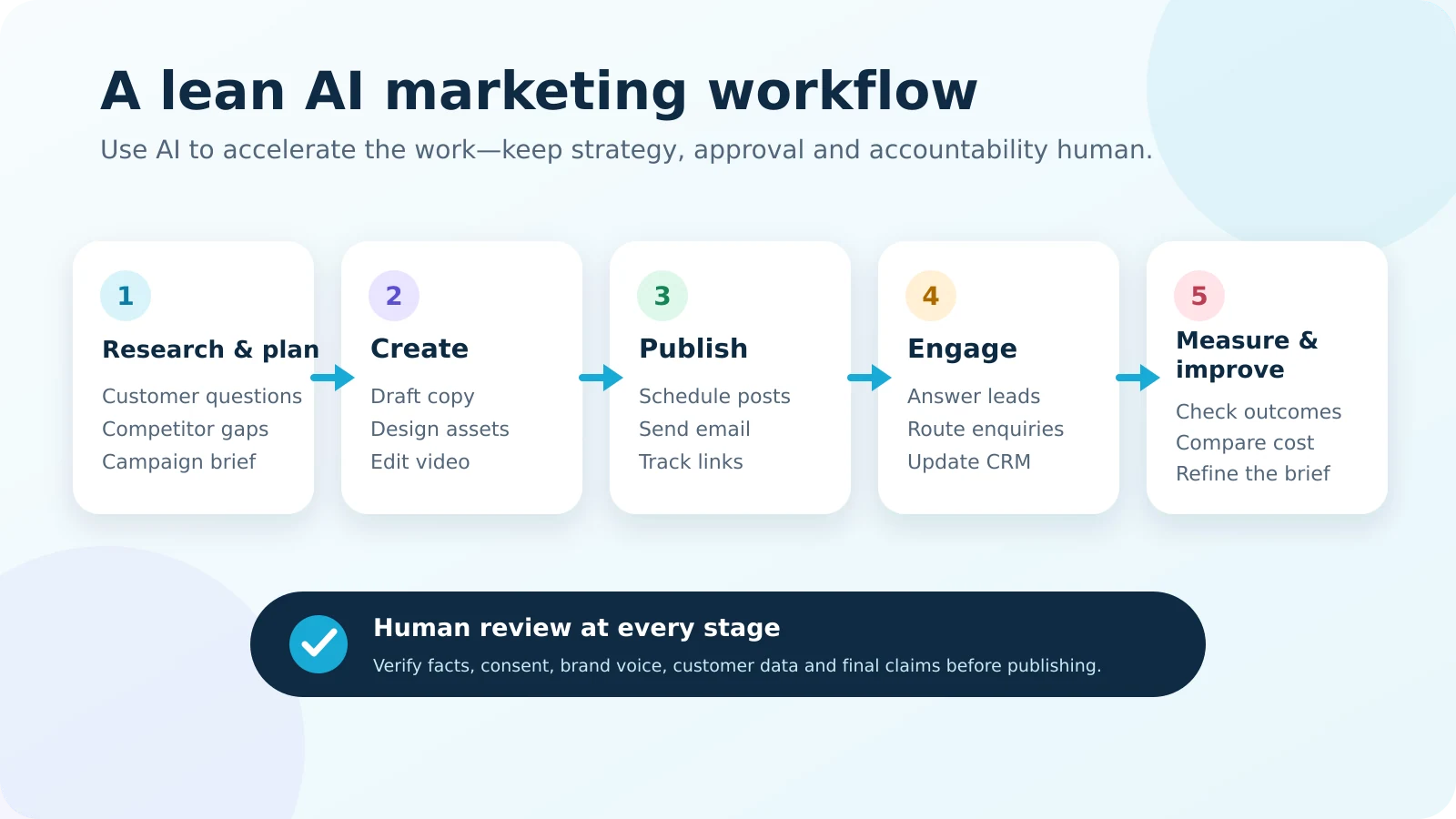
15 best AI marketing tools for small businesses: quick comparison
| Tool | Best for | Free or low-cost entry | Important limitation |
|---|---|---|---|
| ChatGPT | Planning, drafts and analysis | Free plan; Plus $20/month | Outputs still require fact and brand review |
| Google Gemini | Research and Google-connected work | Free access; paid AI plans vary by region | Features and limits differ by account and country |
| Perplexity | Source-led market research | Free; Pro $20/month | A citation is a starting point, not proof by itself |
| Canva | Branded graphics and campaign assets | Free; Pro $144/year for one person | Advanced AI and premium assets have plan limits |
| Adobe Express | Fast design, resizing and scheduling | Free; Premium price varies by region | Generative credits and assets are plan-dependent |
| Grammarly | Editing, clarity and tone | Free; Pro advertised from $12/month | Strong editing cannot rescue a weak offer |
| Buffer | Simple social scheduling | Free for 3 channels; paid from $5/channel/month annually | Free queue holds 10 scheduled posts per channel |
| Metricool | Social planning and analytics | Free for 1 brand and 20 posts/month | Free plan excludes LinkedIn and X connections |
| HubSpot | CRM, lead tracking and follow-up | Free CRM for up to 2 users; paid tiers available | Advanced automation and agents require upgrades |
| Mailchimp | Beginner email campaigns | Free up to 250 contacts and 500 sends/month | The free plan becomes restrictive quickly |
| Brevo | Affordable email and automation | Free with 300 email sends per day | Daily cap does not roll over |
| Zapier | Connecting marketing apps | Free with 100 tasks/month | Published AI steps and multi-step workflows may require paid plans |
| Tidio | Live chat and AI-assisted support | Free live chat; 50 one-time Lyro AI conversations | The free AI allowance is not a recurring monthly pool |
| CapCut | Short-form marketing video | Free; Pro $19.99/month | AI credits and premium assets can run out |
| Predis.ai | AI social creatives and ad concepts | 3-day trial; Core $19/month billed annually | It is low-cost, but not a permanent free tool |
Pricing note: Amounts above are public list prices or limits visible on official pages at the review date. Taxes, exchange rates, promotions, annual billing and regional availability can change the final cost.
Detailed reviews: what each AI marketing tool is actually good for
1. ChatGPT — best all-around AI marketing assistant
ChatGPT is the most flexible starting point for a small business that needs help turning scattered ideas into structured work. It can draft a campaign brief, create interview questions, summarize customer feedback, generate variations of an offer, outline an article and analyze a spreadsheet. The free plan provides broad access to chat capabilities and selected tools; ChatGPT Plus is listed at $20 per month for higher limits and wider feature access.
Use it for: first drafts, audience questions, content outlines, offer positioning, ad-angle variations and analysis of non-sensitive campaign data. Create a short brand brief containing audience, tone, proof, prohibited claims and preferred call to action, then attach that brief to every task.
Watch out for: confident but unsupported claims, outdated facts and generic copy. Do not paste private customer records, payment details or confidential contracts into a personal AI account unless your data policy permits it. Review the official ChatGPT Free guidance and Plus details before upgrading.
2. Google Gemini — best for Google-connected research and productivity
Gemini is a practical choice for businesses already working in the Google ecosystem. It is useful for brainstorming, summarizing documents, creating campaign structures and exploring customer questions. Paid Google AI plans increase usage and add benefits, but availability, storage and limits differ by country and account.
Use it for: reorganizing a long planning document, generating alternative headlines, summarizing a meeting and turning a rough idea into a checklist. It can be especially convenient when the team already uses Google Workspace, although access to specific integrations should be confirmed for the account.
Watch out for: assuming every advertised feature is available in every region. Start with the free experience, document the exact task you want to improve and upgrade only when the free limit repeatedly blocks that task. See the official Google AI plan guidance.
3. Perplexity — best for source-led market and competitor research
Perplexity is useful when the job begins with questions rather than copy. It presents answers with links, which makes it faster to build a preliminary market map, find definitions, compare public product information and collect source material. Its standard plan is free, while Perplexity Pro is listed at $20 per month.
Use it for: finding official product pages, mapping competitor claims, identifying recurring customer questions and gathering sources for a writer. Ask for primary sources and open every important citation before using the information.
Watch out for: citing a page that does not support the exact claim. AI research tools can misread context, surface old pages or combine information incorrectly. Keep a source log with page title, URL, access date and the exact fact supported. Review Perplexity’s official plan comparison.
4. Canva — best for everyday branded marketing design
Canva combines templates, image editing, brand controls, scheduling and AI-assisted creation in one approachable interface. A small business can use it for social posts, lead magnets, simple presentations, promotional banners and resized campaign variations. Canva Free includes limited AI usage; Canva Pro is listed at $144 per year for one person on the US pricing page.
Use it for: turning approved copy into channel-specific graphics, maintaining a small brand kit, adapting one campaign into several sizes and building repeatable templates that non-designers can use.
Watch out for: template sameness and unverified AI-generated visuals. Keep consistent margins, typography and image treatment. Check commercial-use terms for generated and stock assets, particularly for client or product work. Confirm current allowances on Canva’s official pricing page.
5. Adobe Express — best Canva alternative for fast content production
Adobe Express offers a capable free plan with templates, stock assets, basic editing, limited generative AI credits and social scheduling. It is a sensible alternative when a team prefers Adobe’s ecosystem or needs a second option for resizing, video and brand assets. Paid pricing is localized, so the amount shown depends on region.
Use it for: simple promotional graphics, short videos, flyers, document-based content and scheduling to a limited number of social accounts. The free plan can cover a genuine small-business workflow before a paid upgrade is necessary.
Watch out for: consuming generative credits during experimentation. Approve the campaign concept in a low-cost draft first, then use higher-value AI actions for final assets. Compare current regional plans on the official Adobe Express pricing page.
6. Grammarly — best for editing marketing copy and keeping tone consistent
Grammarly is most valuable near the end of the writing process. It can flag errors, help adjust tone and suggest clearer wording across emails, landing pages, proposals and social captions. The free plan includes core writing help and a limited number of AI prompts; Grammarly Pro is advertised from $12 per month on the plan page.
Use it for: editing customer-facing copy, improving clarity, spotting accidental tone problems and creating a final quality-control pass before publication.
Watch out for: accepting every rewrite. Marketing language sometimes needs deliberate rhythm, technical terminology or culturally specific wording. The owner of the message should make the final decision. See the official Grammarly plan comparison.
7. Buffer — best for simple, affordable social scheduling
Buffer is a strong fit for a small team that wants a clean publishing queue without paying for an enterprise social suite. The free plan connects up to three channels and allows ten scheduled posts per channel. Buffer’s AI Assistant is included, while Essentials starts at $5 per channel per month when billed yearly.
Use it for: scheduling approved content, adapting one message for several networks, organizing ideas and maintaining a consistent publishing rhythm. Pair every scheduled link with campaign parameters created by the Artsians UTM Link Builder.
Watch out for: filling a queue with low-value AI posts. Schedule fewer, stronger posts and review actual engagement rather than measuring output volume. Check Buffer’s official pricing.
8. Metricool — best for a social calendar plus basic analytics
Metricool combines planning, publishing, competitor monitoring and analytics. Its free plan supports one brand, up to twenty posts per month, five competitor profiles, thirty days of analytics and a small monthly AI-assistant allowance. The free plan does not connect LinkedIn or X, an important limitation for B2B users.
Use it for: creating a monthly content calendar, comparing post performance, reviewing competitor activity and turning approved ideas into network-specific captions. It is a good choice when basic reporting matters as much as scheduling.
Watch out for: comparing unlike metrics across platforms. Choose a consistent denominator and use the Social Media Engagement Rate Calculator to document how a rate was calculated. See Metricool’s official pricing page.
9. HubSpot — best free CRM foundation for growing lead pipelines
HubSpot’s free CRM is valuable when marketing activity is generating enquiries but follow-up is inconsistent. The free account supports up to two users and one thousand contacts, and includes contact management, pipelines, reporting and Breeze Assistant. More advanced automation and AI agents sit in paid tiers.
Use it for: capturing leads, assigning next actions, recording customer conversations, drafting follow-up emails and monitoring pipeline movement. A CRM creates more value when the team agrees on required fields and response deadlines.
Watch out for: adopting a large platform before defining the process. Start with one pipeline and a small set of fields. Add automation only after the manual process is working. Review HubSpot’s free CRM details.
10. Mailchimp — best familiar email platform for a very small list
Mailchimp remains approachable for a business sending its first newsletters. The current free plan is limited to 250 contacts, 500 monthly email sends and 250 sends per day. Paid Standard pricing varies with contact count and adds more advanced generative AI, insight and automation features.
Use it for: a small monthly newsletter, basic forms and a simple welcome journey while the list is still tiny. Its value is familiarity and a broad template ecosystem, not the largest free sending allowance.
Watch out for: outgrowing the free tier and paying for inactive contacts. Clean the audience, record consent and compare projected cost before importing a large database. Confirm the latest limits on Mailchimp’s official pricing page.
11. Brevo — best free email volume for budget-conscious businesses
Brevo’s free plan includes 300 email sends per day, storage for up to 100,000 contacts, basic reporting, email campaigns, transactional email and limited automation. Aura, Brevo’s AI assistant, is also included. For many small businesses, the daily sending model is more practical than a very small contact-based free allowance.
Use it for: newsletters, nurture sequences, transactional messages and small automated journeys. Separate engaged subscribers from inactive records and use a consistent naming system for campaigns and segments.
Watch out for: assuming stored contacts equal permission to email. Maintain consent records and comply with the rules that apply to the recipient’s location. See Brevo’s official plan guidance.
12. Zapier — best for connecting repetitive marketing tasks
Zapier connects apps through workflows triggered by events such as a form submission, new spreadsheet row or CRM update. The free plan includes one hundred tasks per month, unlimited draft assets and two-step workflows. Copilot can help build automations in plain language, but publishing advanced AI steps and using multi-step workflows may require a paid plan.
Use it for: sending a qualified form lead to the CRM, notifying a team member, adding campaign data to a sheet or creating a task after a customer action. Estimate the value first with the AI Automation Savings Calculator.
Watch out for: automating a broken process. Write the manual steps, define error handling and keep a recovery path. Review Zapier’s official Free-plan limits.
13. Tidio — best for testing live chat and an AI support agent
Tidio combines live chat, flows and the Lyro AI Agent. The free live-chat plan is ongoing, while new accounts receive fifty Lyro AI conversations as a one-time allowance. After that allowance is used, continuing the AI agent requires a paid Lyro plan.
Use it for: answering repetitive pre-sale questions, collecting contact details outside business hours and routing conversations that require a person. Build the knowledge base from approved policies, prices and service information.
Watch out for: letting a bot answer high-risk questions or invent terms. Provide an obvious human handoff and audit transcripts. Confirm current allowances on Tidio’s official pricing page.
14. CapCut — best for quick short-form marketing video
CapCut offers a free editor with basic templates and tools, while Pro is listed at $19.99 per month and includes additional AI credits, premium templates and storage. It can speed up captions, resizing, background work and the assembly of short promotional clips.
Use it for: product demonstrations, talking-head clips, customer-education videos and platform-specific versions. Begin with a clear hook, one promise and one call to action instead of relying on visual effects.
Watch out for: stock-looking templates, unlicensed media and over-editing. Preserve the speaker’s natural voice and verify usage rights. Check the official CapCut pricing page.
15. Predis.ai — best low-cost specialist for social and ad creative drafts
Predis.ai focuses on social posts, videos, product creatives, ad concepts and competitor analysis. It is not a permanent free tool: every plan starts with a short trial, and the Core plan is advertised at $19 per month when billed yearly. That can still be cost-effective for a visual-first business producing a regular stream of social assets.
Use it for: generating early creative directions, adapting product information into post ideas and producing variations for human selection. Treat the output as a starting point, then apply the brand’s typography, proof and visual standards.
Watch out for: subscribing before testing whether the creative is genuinely usable. Run the trial with one real campaign brief and count the assets that pass review. See Predis.ai’s official pricing page.
How to choose an AI marketing tool without wasting money
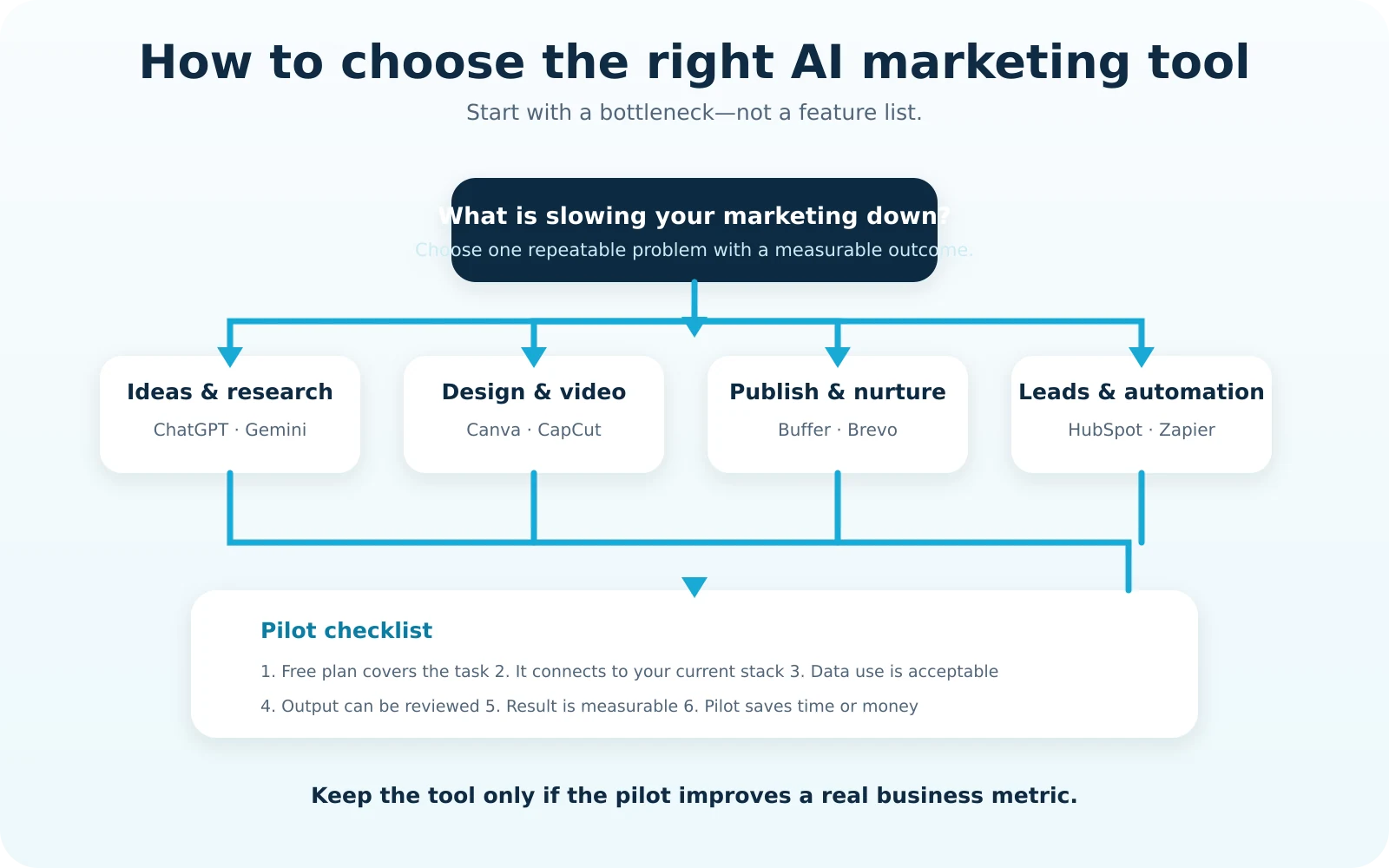
- Name the bottleneck. “We need AI” is not a requirement. “Our assistant spends six hours every week rewriting the same service information for social media” is.
- Record a baseline. Measure the current hours, direct cost, output volume, error rate and business result.
- Test the free plan with real work. Do not evaluate a tool using a polished demo. Use one actual campaign and your normal approval process.
- Check integrations and export options. Confirm that you can move data, download assets and retain control if you cancel.
- Review privacy and permissions. Decide what customer, employee and business data may be entered. Restrict sensitive information by default.
- Assign a human owner. Someone must approve claims, monitor errors and maintain brand instructions.
- Calculate value after two weeks. Compare the result with the baseline. Use the Marketing ROI Calculator for paid tools and the Marketing Budget Planner before adding another subscription.
Recommended AI marketing stacks by budget
$0 starter stack
- Research and drafts: ChatGPT Free or Gemini.
- Design: Canva Free or Adobe Express Free.
- Social scheduling: Buffer Free or Metricool Free.
- Email and CRM: Brevo Free or HubSpot Free.
- Editing: Grammarly Free.
This stack is enough to validate a process. Pick one option in each category; using both rarely doubles the value.
Under $50 per month
Upgrade the bottleneck only. A service business might choose ChatGPT Plus for heavier planning, Buffer Essentials for one or two critical channels, and keep design, CRM and email on free plans. A visual ecommerce business might prefer Canva Pro or CapCut Pro instead of a paid writing tool. Before approving the stack, compare subscription and campaign costs with the Campaign Profit Calculator.
Lead-generation stack
Use HubSpot Free for the pipeline, Brevo for email, Tidio for chat testing and Zapier only for the highest-value handoff. Every lead source should carry a clear campaign label and UTM parameters so revenue can be traced back to marketing activity.
Content-led stack
Use Perplexity for source discovery, ChatGPT or Gemini for structured drafts, Grammarly for editing, Canva for visuals, Buffer for distribution and Metricool for review. A writer or subject-matter expert remains responsible for originality, evidence and final judgment.
What AI marketing tools should never do without human review
- Publish factual, medical, legal, financial or safety claims without verification.
- Upload private customer data when the account and policy are not approved for it.
- Create fake testimonials, reviews, results or endorsements.
- Impersonate customers, employees or public figures.
- Send large campaigns without consent checks, suppression lists and a test send.
- Change prices, terms or offers without the business owner’s approval.
- Measure success only by the amount of content produced.
A practical 30-day AI marketing implementation plan
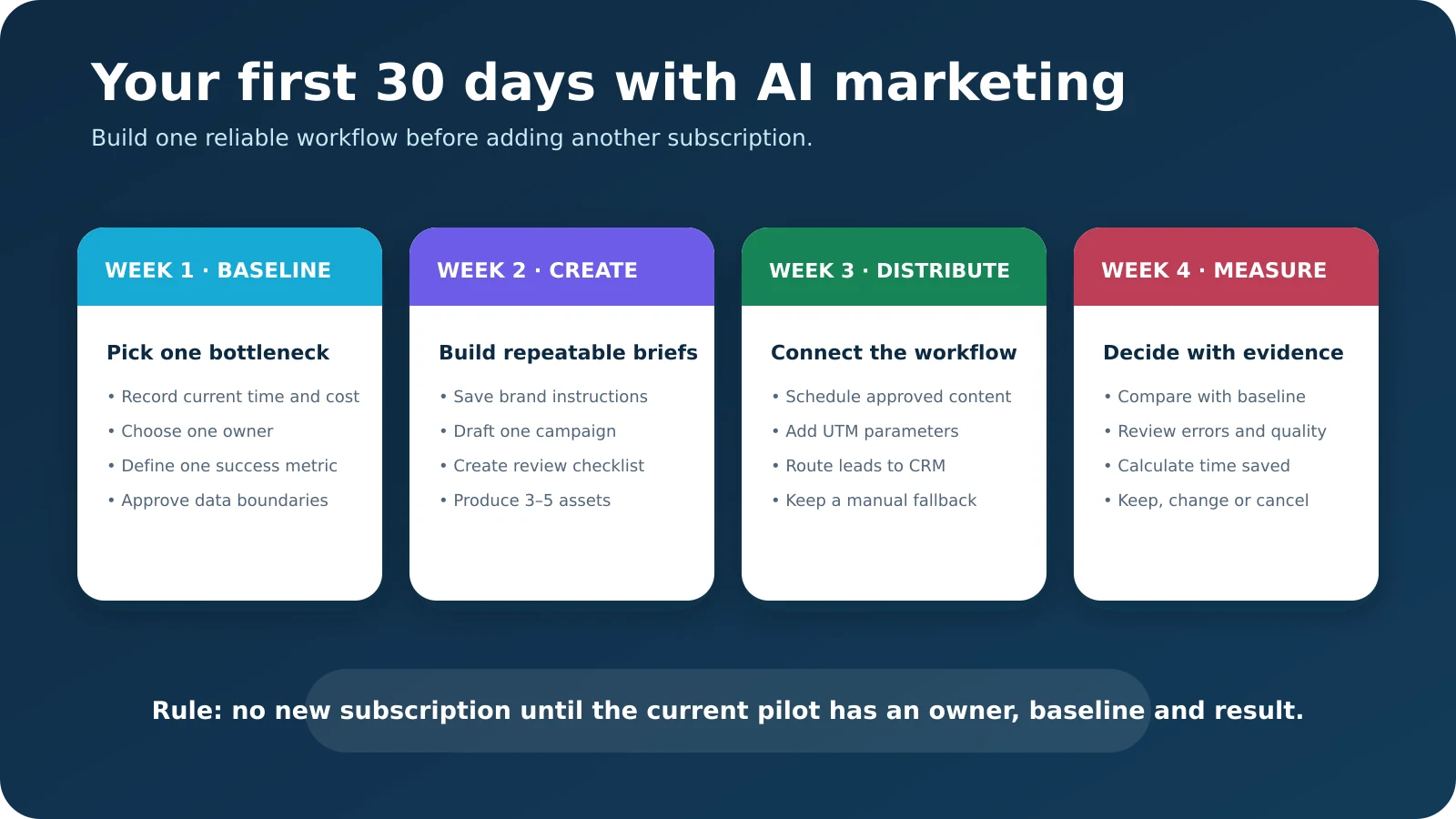
Week 1: establish the baseline
Choose one repetitive task and measure its current cost, time and result. Define what information the AI tool may access, who approves its output and what would count as a successful pilot.
Week 2: build the content system
Create a reusable brand brief, campaign brief and review checklist. Produce a small set of real assets. Record edits so future instructions improve instead of repeating the same mistakes.
Week 3: connect distribution
Schedule approved content, add UTM parameters and route leads to the correct record or person. Keep a manual fallback in case an automation fails.
Week 4: measure and decide
Compare time, cost, quality and business outcomes with the baseline. Keep the tool if it creates repeatable value. Change the process if quality is inconsistent. Cancel it if the subscription merely increases output without improving a meaningful result.
Frequently asked questions
Which AI marketing tool is best for a small business?
ChatGPT is the most flexible all-around starting point, while Canva is often the fastest design choice. The best final answer depends on the bottleneck: Buffer for scheduling, Brevo for email, HubSpot for CRM, Zapier for automation and Tidio for chat.
Can a small business build an AI marketing stack for free?
Yes. A practical free stack can combine ChatGPT or Gemini, Canva or Adobe Express, Buffer or Metricool, Grammarly, and Brevo or HubSpot. Free limits are enough for testing, but they should be checked before a large campaign.
How much should a small business spend on AI marketing tools?
Start at $0 and pay only after a tool solves a measured problem. Many small businesses can run a useful stack for under $50 per month by upgrading one bottleneck instead of every category.
Will AI marketing tools replace a marketer?
No. They can accelerate research, drafting, editing, design and routing, but they do not own strategy, customer understanding, accountability, evidence or final approval.
Is AI-generated marketing content safe for SEO?
It can be, if the final content is original, accurate, useful and created for the reader. Publishing repetitive or unsupported text at scale is risky regardless of whether a human or AI produced the first draft.
How should a business protect customer data when using AI?
Minimize the data entered, remove identifying details, use approved business accounts, review vendor data terms and restrict access. Sensitive information should not be placed into a tool merely because it is convenient.
How can a business measure AI marketing ROI?
Record a baseline, include subscription and staff costs, measure hours saved and track business outcomes such as qualified leads, sales or retained customers. Compare the pilot with the previous process rather than with an AI-generated forecast.
Final recommendation
Begin with one free tool and one business problem. Build a reviewable workflow, keep humans responsible for claims and customer data, and upgrade only when the evidence supports it. The most successful small-business AI stack is not the one with the most logos; it is the one the team can understand, control and measure.
Sources and review notes
This article was reviewed by Usman Arshad for Artsians and last checked on November 5, 2026. Product limits and prices were sourced from the official plan or help pages linked in each section. Prices exclude taxes and may differ by region, billing cycle, promotion and account eligibility.
Editorial policy: No ranking position, revenue result or vendor performance is guaranteed. Tools were selected for practical small-business use, availability of a free or comparatively low-cost entry point, workflow coverage and transparent limitations. Artsians received no payment for inclusion in this package.
Comments